
What is Auto-Clustering
This guide is maintained for Ruk-Com PaaS. Screens and options may vary by platform version and account permissions.
Confirm the environment, region and account permissions, and back up current settings before changing a production system.
In the modern world, the importance of data availability cannot be underestimated. Herewith, you want to maintain immediate access to any required information at a moment’s notice. Thus, for any production solution of any meaningful size, it is highly recommended to configure a cluster. Software clustering is the technique of using at least two instances for a service. Such redundancy not only provides reliability (the system can withstand a failure of at least one instance) but also helps to handle high load.
Based on the experience, the configuration of a cluster can be a challenging process that requires quite a lot of time investment. In order to help you out, the platform automates some of the most popular clusterization solutions and can perform them for you on-demand directly from topology wizard. Such automation immensely simplifies and speeds up the creation of a reliable production-ready cluster for your project.
Enabling Auto-Clustering
Currently, the following templates support the Auto-Clustering feature via the topology wizard:
- application servers - Tomcat/TomEE, GlassFish, Payara, Jenkins, WildFly
- SQL databases - MySQL, MariaDB, Percona, PostgreSQL
- NoSQL database - Couchbase, Redis, OpenSearch
- storage server - Shared Storage Container
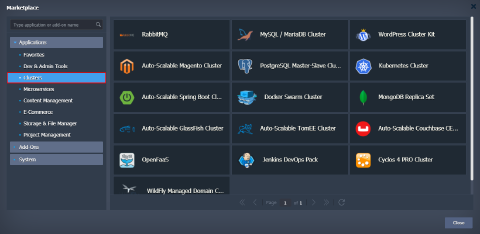
Tip: In addition to the Auto-Clustering option in topology wizard, a number of prepackaged clusterization solutions can be found under the Clusters category of the platform Marketplace.
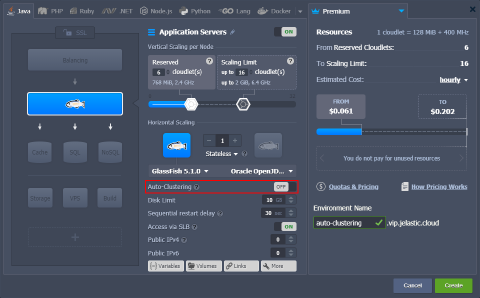
- Select one of the listed stacks in the topology wizard. The appropriate Auto-Clustering switcher will be available in the central part of the frame.
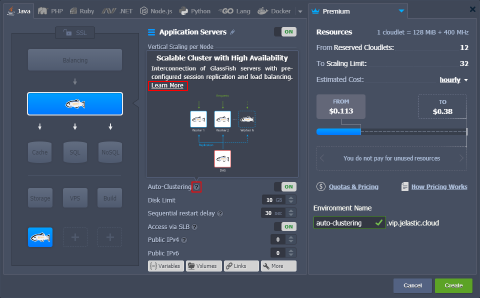
 2. You can hover over the hint icon for additional information on this particular stack auto-clustering implementation. Within the description, you can find the Learn More link to documentation with a more extensive overview.
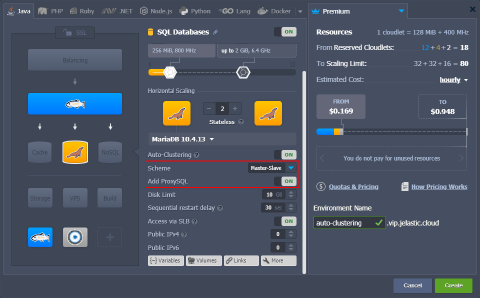
 3. Also, after enabling Auto-Clustering, some additional configs can appear for further customization of the cluster. For example, MariaDB auto-cluster allows to choose replication Scheme and add dedicated ProxySQL load balancer exclusively for this database cluster:
Additional Materials on Auto-Clustering
The platform provides extensive documentation, multiple blog posts, and dedicated GitHub pages on the Auto-Clustering topic:
- Auto-Clustering of Instances via Topology Wizard - lists stacks that support the feature, explains basic management via wizard and Cloud Scripting
- MariaDB/MySQL Auto-Сlustering with Load Balancing and Replication - automatic clustering and replication for MariaDB and MySQL databases for high availability and performance
- PostgreSQL Auto-Clustering with Asynchronous Master-Slave Replication - get multiple copies of essential data within automatic master-slave replication for PostgreSQL database
- Out-of-Box GlassFish & Payara Clustering: Running Java EE Highly-Available Applications in the Cloud - shows how to set up a highly-available cluster with GlassFish and Payara Micro for running Java EE applications
- Jenkins Cluster Hosting for Continuous Integration and Delivery (CI/CD) - automate continuous integration and delivery of your Java applications using pre-configured master-slave Jenkins cluster
- WildFly Managed Domain in Containers: Automatic Micro Clustering and Scaling - explains how to extend your WildFly from a standalone server to cluster in managed domain mode for running cloud-native microservices
- Shared Storage Container Auto-Clustering - configures a reliable storage cluster with AutoFS, NFSv4, and GlusterFS support