
Packaging Standard Overview
This guide is maintained for Ruk-Com PaaS. Screens and options may vary by platform version and account permissions.
Confirm the environment, region and account permissions, and back up current settings before changing a production system.
Packaging Standard (also known as JPS) is a tool to prepare ready-to-go application and add-on templates. Such preconfigured solutions can be integrated within any platform in just one click, simplifying installation and configuration for application of any type.
 JPS package is based on JSON installation manifest. This file is used to describe processes of environment creation, application deployment and configuration, allocation of resources and setting scaling limits for each server within an environment.
This technology allows to automate complex CI/CD scenarios and easily distribute your ready-to-go solutions with one-click installation widgets.
Application CI/CD Automation with Cloud Scripting
Powered by a special platform-developed Cloud Scripting language, JPS packaging technology can help to completely automate the application delivery process - e.g., to automatically transfer each new application version through development, testing and production stages. This is ensured by applying the required project processing logic through interconnecting different platform API methods.
 Due to the variety of tuning and automation options available, you can implement almost any required scenario by means of Cloud Scripting - from executing pretty simple operations to maintaining complex distributed applications and clusters. To achieve this and build own custom solution, with CS you are able to:
- predefine the required configuration properties and declare expected application behavior with the help of appropriate actions
- bound these operations to particular application lifecycle events
- fetch user input data and use it inside
- execute custom scripts right within created containers
Widget for Instant Application Deploy
Once your application is packed into JPS, you can provide other developers with a widget for its fast installation. This helps to additionally improve application distribution efficiency and increase its general appeal due to deployment simplicity. Simultaneously, such approach reduces spends for your project support and after-install management.
Widget contains manifest (or a link to its source) with description of cloud environment, needed for this application, and instructions on its automated installation and configuration.
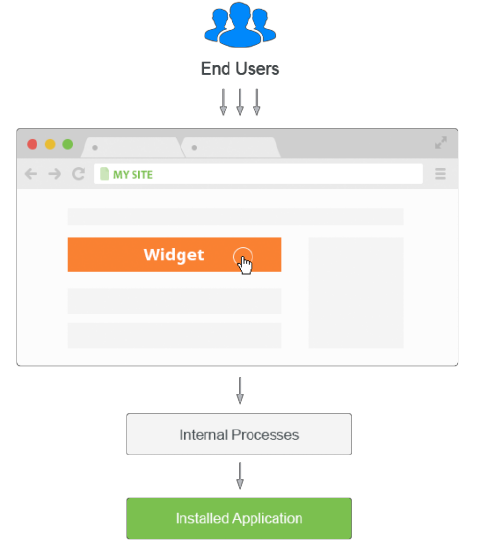
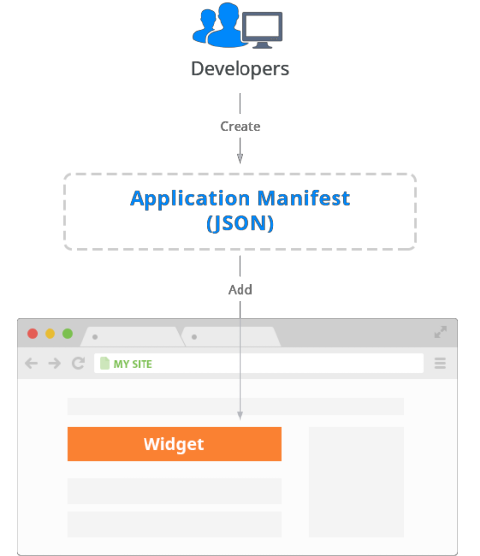 To install packaged application into the platform, a user needs to initiate installation by means of the chosen widget and receive confirmation URL via specified email. Once this link is followed, the platform will automatically parse and process manifest data to create or tune the appropriate environment and interconnect the required nodes. As a result, a user gets a fully configured running application without any extra configuration steps required.
 Use the docs below to find out information on how to properly compose application manifest and create such installation widget:
- Application Manifest
- Application Manifest Example
- Placeholders
Note: After packaging your own application due to our instructions, you can contact your hosting provider and negotiate adding your JPS to the set of solutions within Marketplace at the dashboard. In such a way, your app will be available for automatic deploy to all users within your hosting platform.