
Preserve Data
This guide is maintained for Ruk-Com PaaS. Screens and options may vary by platform version and account permissions.
Confirm the environment, region and account permissions, and back up current settings before changing a production system.
The platform automatically preserves sensitive system files and container configurations to ensure that all your customizations are present on containers after redeployment. The default list includes the following data:
-
all the previously specified custom container configurations (like run commands, links, variables, etc.) won’t be affected
- including the content of volumes (default and custom ones)
-
AutoFS and NFS related configurations (/etc/autofs.Ruk-Com PaaS, /etc/auto.master, /etc/exports)
- firewall configurations (/etc/nftables/container-defined.nft, /etc/nftables/user-defined.nft, /etc/sysconfig/iptables-custom, /etc/sysconfig/iptables4-Ruk-Com PaaS, /etc/sysconfig/iptables6-Ruk-Com PaaS, /etc/iptables/rules.v4)
- SSH access data (/root/.ssh/authorized_keys, /root/.ssh/authorized_keys2, /root/.ssh/id_rsa)
Additionally, each platform-managed container is provided with a special /etc/Ruk-Com PaaS/redeploy.conf file. It lists the software stack-specific configs required to ensure container operability. These settings are also automatically preserved by the platform during the container redeployment. You can easily access the file (e.g., via the dedicated Favorites shortcut in the embedded file manager) and modify it if needed.
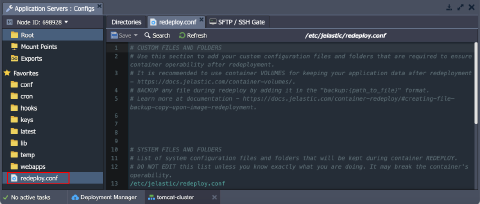 The redeploy.conf file is divided into system and custom sections.
System Files and Folders
Each platform-managed container is provided with a predefined list of system configuration files that should be preserved during the redeployment. You don’t need to manually change this list unless you know exactly what you are doing.
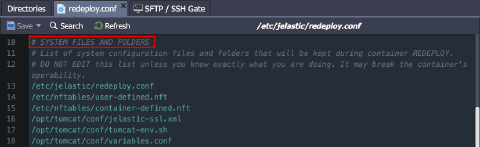 The exact list varies for different software stacks but also has several common configuration files that are included in all containers:
- /etc/Ruk-Com PaaS/redeploy.conf - saves the current redeployment config itself (to store the list of required files and directories during each further container redeploy)
- ${home}/.bash_profile - contains the default SSH shell settings (shell introduction message, the required configuration files to be fetched, etc.)
- /etc/nftables/container-defined.nft - contains default image specific firewall rules
- /etc/nftables/user-defined.nft - sets user-defined custom firewall rules
Note: For legacy Centos 7 based containers, the following firewall configs are used instead:
*   _**/etc/sysconfig/iptables**_ - keeps the default firewall rules
*   _**/etc/sysconfig/iptables-custom**_ - contains custom firewall rules
- /var/lib/Ruk-Com PaaS/keys - stores uploaded SSH private keys, which are necessary to access the container via SSH and for interaction with other containers
Also, redeploy.conf for each particular node type include different stack-specific files.
| Stack | Path |
|---|---|
| Tomcat | /opt/tomcat/conf/Ruk-Com PaaS-ha.xml /opt/tomcat/conf/Ruk-Com PaaS-ssl.xml /opt/tomcat/conf/tomcat-env.sh /opt/tomcat/conf/variables.conf /opt/tomcat/temp/ /var/spool/cron/tomcat |
| TomEE | /opt/tomcat/temp/ /var/spool/cron/tomcat |
| GlassFish | /home/Ruk-Com PaaS/.ssh /home/Ruk-Com PaaS/.ssh2 /opt/glassfish/glassfish/domains/domain1/applications /opt/glassfish/glassfish/domains/domain1/config/admin-keyfile /opt/glassfish/glassfish/domains/domain1/config/domain.xml /opt/glassfish/hazelcast.xml /opt/glassfish/glassfish/domains/domain1/config/variables.conf /opt/glassfish/glassfish/domains/domain1/docroot /opt/glassfish/glassfish/nodes /root/contexturl /var/spool/cron/glassfish /var/lib/Ruk-Com PaaS/hooks |
| Golang | /home/Ruk-Com PaaS /var/lib/Ruk-Com PaaS/app.info /var/lib/Ruk-Com PaaS/keys /var/lib/Ruk-Com PaaS/vcs /var/spool/cron/golang |
| Payara | /home/Ruk-Com PaaS/.ssh /home/Ruk-Com PaaS/.ssh2 /opt/payara/glassfish/domains/domain1/applications /opt/payara/glassfish/domains/domain1/config/admin-keyfile /opt/payara/glassfish/domains/domain1/config/domain.xml /opt/payara/hazelcast.xml /opt/payara/glassfish/domains/domain1/config/variables.conf /opt/payara/glassfish/domains/domain1/docroot /opt/payara/glassfish/nodes /root/contexturl /var/spool/cron/payara /var/lib/Ruk-Com PaaS/hooks |
| Spring Boot | /home/Ruk-Com PaaS/conf /home/Ruk-Com PaaS/APP /var/lib/Ruk-Com PaaS/keys /var/spool/cron/jvm |
| Apache PHP | backup:/etc/php.ini /etc/php.d/ /var/spool/cron/apache /var/www/.ssh/ |
| Apache Ruby | /var/lib/Ruk-Com PaaS/env /var/spool/cron/apache |
| Couchbase | /opt//etc/ |
| MariaDB | /etc/my.cnf /etc/php.ini /var/lib/mysql/.ssh/ /var/spool/cron/mysql |
| Maven | /opt/maven/.ssh/ /var/spool/cron |
| Memcached | /etc/sysconfig/memcached |
| MySQL | /etc/my.cnf /etc/php.ini /var/lib/mysql/.ssh/ /var/spool/cron/mysql |
| NGINX (load balancer) | /etc/dhcp/dhcpd.conf /etc/nginx/conf.d /etc/nginx/neighbors /etc/nginx/nginx-Ruk-Com PaaS.conf /etc/nginx/tcpmaps/mappings.xml /etc/nginx/upstreams /var/lib/nginx/.ssh/ /var/spool/cron/nginx /var/lib/Ruk-Com PaaS/SSL |
| NGINX PHP | backup:/etc/php-fpm.conf backup:/etc/php.ini /etc/php.d/ /etc/sysconfig/php-fpm /var/lib/nginx/.ssh/ /var/spool/cron/nginx |
| NGINX Ruby | /var/lib/Ruk-Com PaaS/env /var/spool/cron/nginx |
| NodeJS | /home/Ruk-Com PaaS//.ssh/ home/Ruk-Com PaaS//.ssh2/ var/spool/cron/nodejs /home/Ruk-Com PaaS/ROOT |
| PerconaDB | /etc/my.cnf /etc/php.ini /var/spool/cron/mysql |
| PostgreSQL | /etc/php.ini /var/lib/pgsql/.ssh/ /var/spool/cron/postgres ${home}/lib/ ${home}/share/ |
| Varnish | /etc/nginx /etc/varnish /etc/sysconfig/varnish /var/lib/varnish /var/spool/cron/varnish |
| WildFly | /opt/contexturl /home/Ruk-Com PaaS/.ssh/ /var/spool/cron/wildfly /opt/wildfly/domain /opt/wildfly/standalone /opt/wildfly/welcome-content/index.html /var/lib/Ruk-Com PaaS/hooks |
Custom Files and Folders
You can supplement the default list of system configurations with your custom files and folders (if needed). Open the redeploy.conf file and add an entry to the “custom files and folders” section with a full path to the required item (each entry should be in a separate line).
It is recommended to only add system configuration files that are required to ensure container operability during redeployment. Use container volumes for other cases (e.g., to keep your application data).
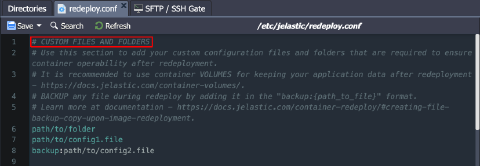 If needed, you can keep the configuration file existing and new versions (i.e., before and after redeployment). Namely, a backup copy of the existing configuration file will be created before replacing the original file with a version from the new tag.
To create a backup, you need to specify a path to the necessary file in redeploy.conf and add the “backup:” prefix to the record:
text Copy
backup:{path_to_file}
Note: This operation is available for files only (not directories).
After the redeploy, config from the old container can be easily recognized by the appropriate “backup” or “timestamp” extensions. They can be used for an instant rollback upon incompatibility with the new configs or for analysis of the changes:
- {file_name} - file from the redeployment target image (from the new tag)
- {file_name}.{timestamp} - backup version of the file created just before the redeploy operation (a separate file for each redeployment to a different tag)
- {file_name}.backup - the latest backup of the file (automatically replaces the previous same-named backup)
This way, you can easily switch to the previously used settings by substituting the file with its backup (through file renaming or content copying).