Database Auto-Configuration
This guide is maintained for Ruk-Com PaaS. Screens and options may vary by platform version and account permissions.
Confirm the environment, region and account permissions, and back up current settings before changing a production system.
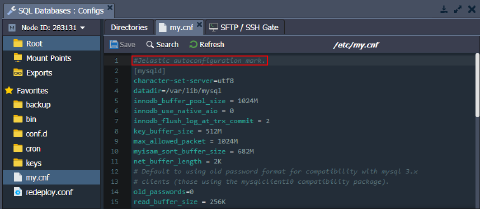
The platform Smart Auto-Configuration automatically adjusts the MySQL, MariaDB, and Percona databases in accordance with the resource limit allocated to the containers. Namely, the changes affect the /etc/my.cnf configuration file and the following settings in particular:
- key_buffer_size
- table_open_cache
- myisam_sort_buffer_size
- innodb_buffer_pool_size
Starting with the 5.7 and 8.0 versions of the MySQL/Percona and MariaDB 10.x, two additional parameters are configured by the platform:
- innodb_buffer_pool_instances - deprecated in MariaDB since the 10.6.x (always 1 pool instance)
- innodb_buffer_pool_chunk_size
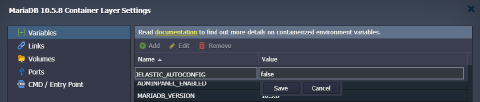
If you want to manually change any of the settings from the list above, you need to set the Ruk-Com PaaS_AUTOCONFIGenvironment variable to “false”, “disable”, or “0”. Otherwise, your custom changes will be overwritten.
Tip: Alternatively, you can override any of the settings in the /etc/my.cnf file (including ones managed by the platform’s Smart Auto-Configuration) by stating them in the /etc/mysql/conf.d/my_custom.cnf file.
Legacy Implementation
If you want to manually change the auto-configured settings on the old containers, you need to remove the “#Ruk-Com PaaS autoconfiguration mark.” line at the start of the /etc/my.cnf file.