
Python Engine
This guide is maintained for Ruk-Com PaaS. Screens and options may vary by platform version and account permissions.
Confirm the environment, region and account permissions, and back up current settings before changing a production system.
Python Engine is a platform-managed container template for modern Python web applications. Unlike Apache Python, it runs the application process directly via Uvicorn or Gunicorn. There is no reverse proxy (such as Nginx or Caddy) inside the container — the application server is the HTTP(S) endpoint.
The Python Engine template supports the following two process managers:
- Uvicorn for ASGI-native frameworks such as FastAPI, Starlette, Django Channels, and Quart.
- Gunicorn for WSGI frameworks such as Django and Flask.
Tip: If needed, you can switch between process managers with container redeploy or by adjusting the PROCESS_MANAGERcontainer variable (uvicorn or gunicorn; a container restart is required to apply changes).
Refer to Python Apps Specifications for more details about the deployment workflow, dependency installation logic, and application autodetection. It also covers topics such as traffic flow, platform SSL, and static file serving.
Create Python Engine Environment
-
Access the topology wizard by clicking the New Environment button at the top of the dashboard.
-
Navigate to the Python programming language tab, select the Python Engine application server, and choose the required engine version and process manager (uvicorn or gunicorn).
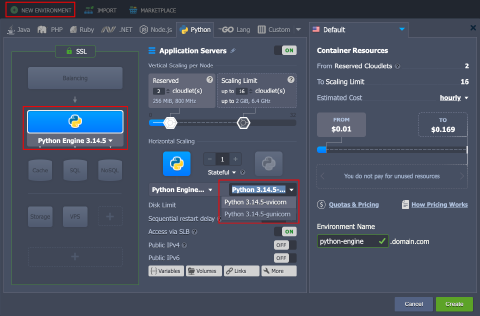 Adjust any other settings (for example, cloudlets limits, public IPs, or region), provide the environment name, and click Create.
- Your environment will be created in a minute.
Uvicorn
Uvicorn is an ASGI server built on asyncio and optimized for async I/O. It is the recommended choice for ASGI-native frameworks such as FastAPI, Starlette, Django Channels, and Quart.
Key characteristics:
- Low overhead and strong performance for async workloads
- Native support for HTTP and WebSocket connections
- Built-in
--reloadmode for development - Runs as a single process by default; use multiple workers or switch to Gunicorn for full process supervision
The platform starts Uvicorn internally during deployment. The following examples show equivalent commands for local development or SSH debugging:
text Copy
uvicorn app.main:app --host 0.0.0.0 --port 8000
uvicorn app.main:app --host 0.0.0.0 --port 8000 --workers 4
Gunicorn
Gunicorn is a prefork process manager and HTTP server for Python web applications. It supervises multiple worker processes, handles graceful reloads and shutdowns, restarts crashed workers, and provides extensive runtime tuning options.
Key characteristics:
- Production resilience: multiple workers, graceful reloads, crash isolation
- Native WSGI support for Django and Flask applications
- ASGI support via the
uvicorn.workers.UvicornWorkerworker class for FastAPI and Starlette - Operational controls:
workers,timeout,graceful-timeout,max-requests,preload_app, access and error logs
The platform starts Gunicorn internally during deployment. The following examples show equivalent commands for local development or SSH debugging:
text Copy
# WSGI applications (Django/Flask)
gunicorn myproj.wsgi:application --bind 0.0.0.0:8000 --workers 4

# ASGI applications (FastAPI/Starlette)
gunicorn -k uvicorn.workers.UvicornWorker app.main:app --bind 0.0.0.0:8000 --workers 4