
NGINX Balancer Configuration
This guide is maintained for Ruk-Com PaaS. Screens and options may vary by platform version and account permissions.
Confirm the environment, region and account permissions, and back up current settings before changing a production system.
The following NGINX configuration files are available:
| Folder | File | Path |
|---|---|---|
| nginx | nginx.conf | /etc/nginx |
| conf.d | /etc/nginx/conf.d | |
| tcpmaps | mappings.xml | /etc/nginx/tcpmaps |
NGINX is a default load balancer that is automatically added if you choose several application servers in your environment topology.
NGINX
The nginx.conf file - the main configuration file for the NGINX balancer - is located in the /etc/nginx folder. By default, it includes the automatically generated settings from the nginx-Ruk-Com PaaS.conf file in the same directory.
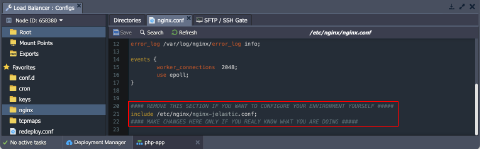
Note: The nginx-Ruk-Com PaaS.conf file is generated automatically and should not be edited manually as your changes will be eventually overwritten by the platform. If you need to change the settings, follow the next steps:
- copy the content of the nginx-Ruk-Com PaaS.conf file
- paste it to the nginx.conf file, replacing the “include /etc/nginx/nginx-Ruk-Com PaaS.conf;” line
- make necessary adjustments directly in the nginx.conf file
CONF.D
The /etc/nginx/conf.d folder contains the additional feature‑specific configuration files for the NGINX load balancer. You can use the include directive in the main nginx.conf file to reference the contents of the feature‑specific files.
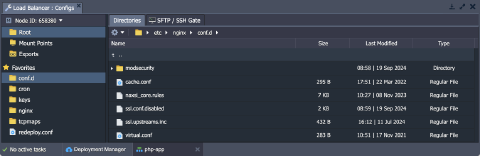 If needed, you can edit existing files or upload your own custom configuration files to the conf.d folder.
TCPMAPS
The /etc/nginx/tcpmaps folder contains the mappings.xml file where you can set the TCP balancing port redirects. Here, you can specify port pairs - one to listen to and the other to redirect to.
Find more information in the NGINX Load Balancing and TCP Load Balancing documents.
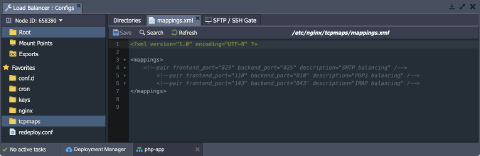 To set caching in NGINX follow the instructions in the linked document.