
Run Configuration
This guide is maintained for Ruk-Com PaaS. Screens and options may vary by platform version and account permissions.
Confirm the environment, region and account permissions, and back up current settings before changing a production system.
The last CMD / Entry Point tab contains two input fields, where you can set the run options for your container:
- Entry Point - configures a command to be executed during container launch
- Run Command - sets defaults for container launch
- if no entry point is specified - a command to be run
- if entry point is provided - additional parameter(s) for the command
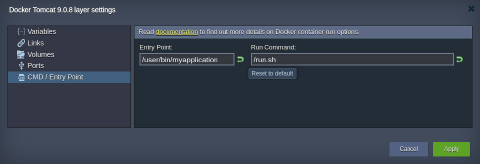 Using the reverse arrow button, which appears upon entering some custom string inside any of these fields, the specified run options can be easily Reset to default values.
Note: If neither run command is declared within the template settings by default, you have to set the appropriate option(s) using this frame. Otherwise, no application/service will be started at the container launch.