
Apache Python
This guide is maintained for Ruk-Com PaaS. Screens and options may vary by platform version and account permissions.
Confirm the environment, region and account permissions, and back up current settings before changing a production system.
Apache Python is the default application server for Python environments running WSGI workloads. It is based on Apache and the mod_wsgi module, which runs Python applications inside Apache worker processes.
This stack is optimized for traditional WSGI frameworks such as Django and Flask. During deployment, the platform automatically installs dependencies listed in requirements.txt and expects a wsgi.py entry point to run the application.
Tip: For async frameworks (FastAPI, Starlette) or projects that use Poetry or Pipenv, consider Python Engine instead.
Create Apache Python Environment
-
Access the topology wizard by clicking the New Environment button at the top of the dashboard.
-
Navigate to the Python programming language tab, select the Apache Python application server, and choose the required engine version.
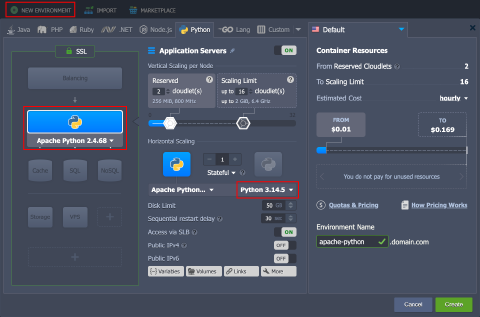 Adjust any other settings (for example, cloudlets limits, public IPs, or region), provide the environment name, and click Create.
- Your environment will be created in a minute.