
Environment Network Isolation
This guide is maintained for Ruk-Com PaaS. Screens and options may vary by platform version and account permissions.
Confirm the environment, region and account permissions, and back up current settings before changing a production system.
Objective
This guide explains how to use Environment Network Isolation on Ruk-Com Cloud PaaS, with ordered procedures and practical verification points.
Before you begin
- Sign in with an account permitted to manage the relevant environment.
- Confirm the target environment, region and resources before saving changes.
- Create a backup or rollback plan before changing a production system.
The availability of this feature depends on the specific hosting provider's settings.
The Network Isolation feature manages default access rules between environments within a single Ruk-Com Cloud installation (e.g. connections over an internal network).
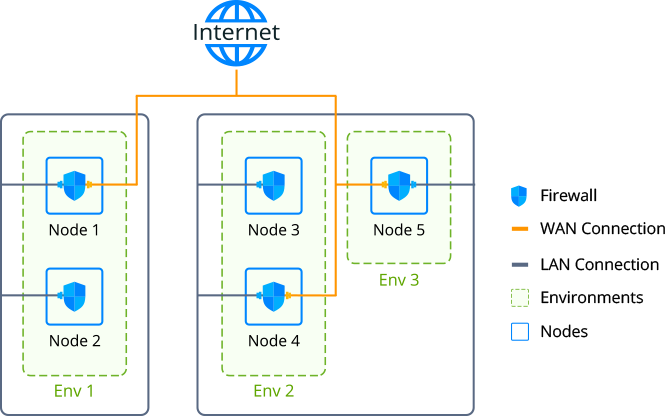
By this method, internal connections between nodes on the platform must pass appropriate checks before being allowed. That is, make sure the requesting and requested environments are in the same separate group.
Tips:Additionally, the connectivity of nodes can be limited byContainer FirewallIt represents a more flexible solution suitable for managing both internal and external access.
Private Network Isolation
If the Network Isolation feature is enabled on the platform, all accounts will be isolated by default. In this case, connections between environments in different user accounts can only be established if both accounts are clearly configured.
Additionally, this feature will help developers separategroup of environmentwithin the account specifically by turning on the switchNetwork Isolationin the frameAdd/Edit Group
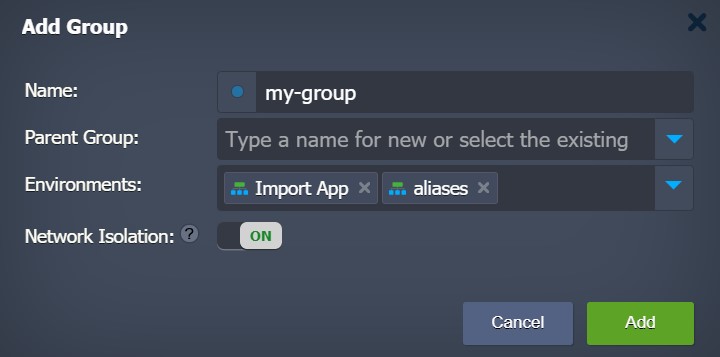
The platform automatically aggregates the internal addresses of containers into a unique set of IPs for each excluded group. This allows controlling access between nodes (i.e. if IPs are in the same set - allow the connection and if not - deny). The platform automatically detects all relevant changes under your account (i.e. deleting environments, resizing nodes, etc.) to keep the IP set up to date.
while managingNetwork IsolationYou should consider the following characteristics:
- IsolationIsolationCan be enabled only for top-level groups (i.e. not forsubgroup)
- Environment groups where isolation is enabled will have a custom protection icon (
 ) for better remembering
 - shared environmentsCollaborators cannot be combined into separate groups.
- This feature is not suitable for restricting access to your containers from outside the platform (e.g. viaPublic IP)
Using Network Isolation
In summary, Network Isolation is a useful and user-focused feature. Its purpose is to prevent unwanted access to your environment. It is generally good practice to keep applications separate. For example:
- If you want to share access to your application or database with third-party employees or companies, You will need to ensure that containers within the isolated group cannot be accessed through the platform's internal network.
- If you arecloningA separate project from the beginning The project will be protected from cloning (i.e. If copying your project becomes "hardcoded" access will be disabled by the Network Isolation feature so that actual production data cannot be changed.)
In this wayNetwork IsolationFeature: Can separate projects in one account and prevent unwanted interconnections.