
Sticky Sessions Routing for Traffic Distributor
This guide is maintained for Ruk-Com PaaS. Screens and options may vary by platform version and account permissions.
Confirm the environment, region and account permissions, and back up current settings before changing a production system.
Objective
This guide explains how to use Sticky Sessions Routing for Traffic Distributor on Ruk-Com Cloud PaaS, with ordered procedures and practical verification points.
Before you begin
- Sign in with an account permitted to manage the relevant environment.
- Confirm the target environment, region and resources before saving changes.
- Create a backup or rollback plan before changing a production system.
This method is used to achieve a relationship with the server by tying the user to a specific backend, which allows them to work with a single version of the application. By first login, routing is based on server weight and backend assignments are remembered to ensure that all subsequent requests from this user are routed to the same environment.
This is typically done through IP address memorization, which is not ideal as there may be many clients behind the proxy, resulting in incorrect balance. Therefore, Ruk-Com Cloud uses a solution that depends on session cookies to create persistent routing. When each browser becomes a unique "user," it helps create more balance.
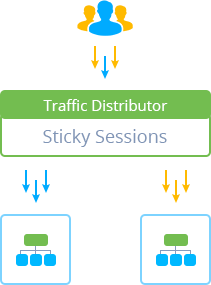
In this case, the distribution of Sticky Sessions among new users is similar to the round robin method and is performed according to a predefined priority. For example, setting 50% to 50% will give both versions of the application the same number of unique user arrivals, which is useful for A/B testing but does not take server weight into account. "Old" user requests will always be redirected to the host to which they were intended until the session expires or the cookie is removed.