
Python Versions
This guide is maintained for Ruk-Com PaaS. Screens and options may vary by platform version and account permissions.
Confirm the environment, region and account permissions, and back up current settings before changing a production system.
Ruk-Com PaaS supports multiple Python engine versions for Apache Python and Python Engine application servers:
- 3.10.21
- 3.11.16
- 3.12.14
- 3.13.15
- 3.14.7
The up-to-date list of releases available on the platform is provided in the regularly updated (weekly) Software Stack Versions document.
Select a version when creating a new environment or change it for existing Python containers.
Create Python Environment
-
Access the topology wizard by clicking the New Environment button at the top of the dashboard.
-
Navigate to the Python programming language tab, select the required application server (Apache Python or Python Engine), and choose the engine version.
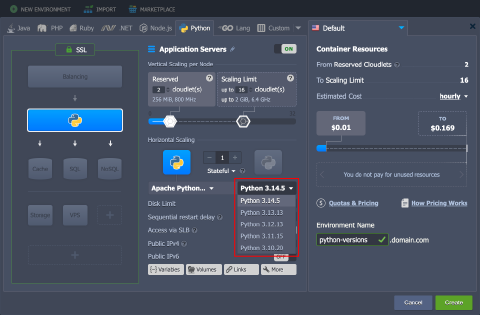 Adjust any other settings (for example, cloudlets limits, public IPs, or region), provide the environment name, and click Create.
- Your environment will be created in a minute.
Change Python Version
You can change the Python engine version for existing containers with container redeploy.
- Open the redeploy dialog in one of the following ways:
- In the topology wizard, click Change Environment Topology next to the environment:
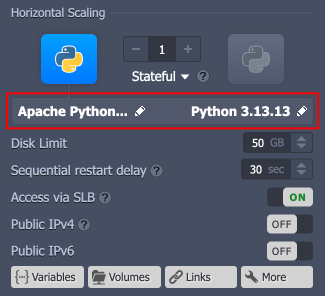 * Click Redeploy container(s) next to the required node or layer:
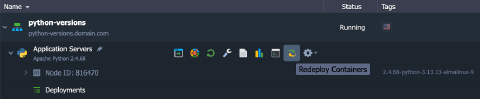 2. In the redeploy dialog, adjust the following settings:
- Tag - select the required Python engine version
- Keep volumes data - protect data in volumes from erasing during redeploy
- Simultaneous or Sequential deployment with delay (for scaled servers only) - choose whether all containers within a layer are redeployed at once or one-by-one
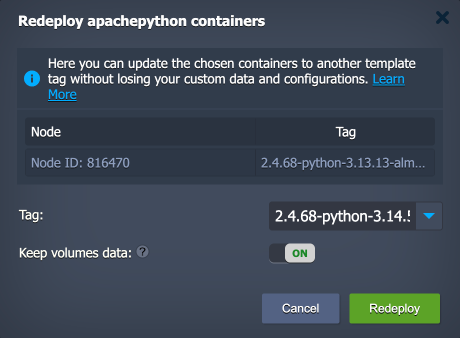 Click Redeploy to proceed.
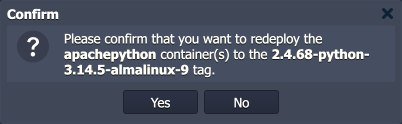
- Confirm the action in the pop-up dialog.
 The Python engine version of your container(s) will be updated in about a few minutes.