
Python Apps Specifications
This guide is maintained for Ruk-Com PaaS. Screens and options may vary by platform version and account permissions.
Confirm the environment, region and account permissions, and back up current settings before changing a production system.
This page describes packaging and deployment requirements for Python applications in Ruk-Com PaaS. Use the table of contents below to find the information you need more quickly:
Dependency Management
The platform installs dependencies automatically during each deployment for both Apache Python and Python Engine. You do not need to create or activate a project virtual environment before deploying - the container provides the isolation boundary.
Notes:
- Dependencies are installed as user
python. - Installation progress and errors are recorded in the deploy log (
/home/jelastic/log/deploy.log). - The uv (
uv.lock) andpylock.toml(PEP 751) tools are currently not supported for automatic deployment. Until implemented, export arequirements.txtfrom your uv project or use Poetry/Pipenv lock files.
Currently, the platform supports the following tools:
| Tool | Stack | Detection trigger | Install behavior |
|---|---|---|---|
| Poetry | Python Engine | poetry.lock or [tool.poetry] in pyproject.toml |
poetry install --no-interaction --no-root |
| Pipenv | Python Engine | Pipfile |
pipenv install --deploy --system if Pipfile.lock exists; otherwise pipenv install --system |
| pip | Apache Python, Python Engine | requirements.txt |
python -m pip install -r requirements.txt |
On Python Engine, when multiple manifest files are present, the platform runs one workflow per deployment in the following order:
- Poetry - if
poetry.lockexists orpyproject.tomlcontains[tool.poetry] - Pipenv - if
Pipfileexists - pip - if
requirements.txtexists
Manual Package Management over SSH (optional)
To inspect or adjust packages outside the deployment workflow, connect to the application server via SSH and use standard pip commands:
pip install {packageName}- installs a packagepip uninstall {packageName}- removes a packagepip install --upgrade {packageName}- updates a packagepip install -r requirements.txt- installs packages from a requirements filepip list- lists installed packages
Application Entry Point
Apache Python expects a WSGI entry point and a dependency manifest in your deployment archive:
wsgi.py- exposes the WSGI application object for mod_wsgirequirements.txt- lists packages installed with pip during deployment
Include both files in the project root of your archive. The platform installs dependencies from requirements.txt and routes HTTP traffic to the application object defined in wsgi.py.
Python Engine uses the APP_MODULE variable to define the application entry point:
APP_MODULE="_AUTO_"(default) - autodetects the entry point during deployment and persists it in/home/jelastic/pythonenv.APP_MODULE="module:attribute"(for example,app:appormyproject.asgi:application) - manually sets the entry point. The platform validates that the specified module can be imported before starting the service. If validation fails, the service does not start and the error is recorded in the log files.
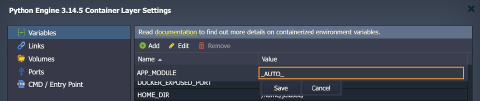
Autodetection works as follows: The platform scans up to three directory levels below ROOT_DIR (/home/jelastic/ROOT) and selects the entry point using the following file priority: app.py>main.py>application.py>server.py>api.py>asgi.py>wsgi.py. When multiple files with the same name exist at different depths, the shallowest match is selected (for example, root app.py takes priority over backend/app.py).
Python Engine
The following sections describe deployment and runtime behavior specific to the Python Engine application server.
Traffic Flow and Networking
Python Engine uses Uvicorn/Gunicorn as the HTTP(S) server without an in-container reverse proxy. The application is bound to the internal port and the platform manages port forwarding. Users reach the app on standard ports 80/443 via the environment URL.
| Layer | Role |
|---|---|
| Platform URL | Users reach your application on port 80 (HTTP) or 443 (HTTPS) via the environment domain |
| Port forwarding | pythonAutoConfig configures nftables rules inside the container to redirect platform traffic to PORT |
| Application server | Uvicorn or Gunicorn binds to HOST/PORT (default 0.0.0.0:8000) and handles HTTP(S) requests |
When platform SSL is disabled (default), TCP port 80 is redirected to the application PORT. When platform SSL is enabled, TCP port 443 is redirected to the application PORT. Port 80 remains available for Let’s Encrypt HTTP validation.
Platform SSL
You do not need to add TLS configuration to your application code for the standard hosting flow. SSL is managed through the platform UI:
- Enable SSL via the Let’s Encrypt add-on or upload a custom certificate.
- The platform provisions certificates and sets
SSLEnabledin/home/jelastic/pythonenv. - The
pythonengineservice restarts andpythonAutoConfigswitches port forwarding from 80 to 443. - The process manager enables TLS on the application server using certificates from
/var/lib/jelastic/SSL/(default paths:jelastic.crt,jelastic.key,jelastic-ca.crt).
Refer to Custom Domains and Built-In SSL for certificate management details.
Static Files
Python Engine does not include a dedicated static-file web server. Static assets are served by the application server (Uvicorn/Gunicorn) or by framework middleware, for example:
- Django -
collectstaticwith WhiteNoise or similar middleware - FastAPI / Starlette -
StaticFilesmiddleware - Flask - built-in static file handling or an extension
For high-traffic static delivery, consider serving assets from a CDN or object storage, adding a load balancer to the environment topology, or using Apache Python when native Apache static file serving is preferred.
Python Engine Variables
The following container variables control Python Engine server behavior (see all default environment variables):
| Variable | Default | Description |
|---|---|---|
| APP_MODULE | _AUTO_ |
Sets the application entry point in module:attribute format (_AUTO_ for autodetection) |
| PORT | 8000 |
Internal bind port; platform traffic on port 80 (or 443 when SSL is enabled) is redirected to this port |
| PROCESS_MANAGER | uvicorn |
Sets the process manager: uvicorn or gunicorn |
| WORKERS | nproc |
Sets the number of worker processes (nproc to set equal to the number of CPUs) |
If needed, you can adjust these variables and restart the container to apply the changes.