
Package Managers
This guide is maintained for Ruk-Com PaaS. Screens and options may vary by platform version and account permissions.
Confirm the environment, region and account permissions, and back up current settings before changing a production system.
Each Node.js application server on the platform includes out-of-the-box support for two package managers: Yarn and npm. Both use the same npm registry and a large collection of packages, so you can standardize and automate installation, updates, configuration, and removal.
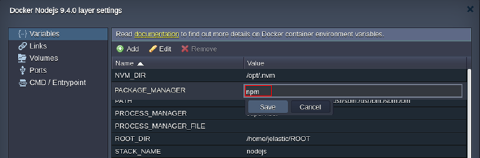
By default, npm is used for archive or Git deployment operations through the platform dashboard. To switch to yarn, open the Docker container settings frame and set the PACKAGE_MANAGER Docker container variable from npm to yarn.
 The sections below cover the basics of each manager so you can choose the one that fits your project:
Node Package Manager (npm)
Node Package Manager (npm) manages modules and packages for your project and can install ready-to-use applications.
There are two ways to install Node.js packages with npm:
- Specify the required packages in the dependencies section of the Node.js package.json file in the root directory of your project. The platform downloads and installs these packages by running
npm installduring application server startup (not during the deploy step itself). New modules added to package.json are installed after a Node.js node restart.
Note:npm ci is not used, and the npm installation command is not configurable.
- Connect to the container via SSH Gate and manage packages manually with the following commands:
npm search {package_name}- to search for modules by name (or part of a name)npm install {package_name}- to install the necessary modulenpm uninstall {package_name}- to remove a previously installed modulenpm update {package_name}- to update the specified module to its latest versionnpm ls installed- to list already installed packages
Yarn Package Manager
Yarn is a package manager that focuses on speed, reliability, and convenience. Yarn uses the same Node.js package.json file as npm, so existing applications do not need changes.
You can use the following commands while connected over SSH Gate:
yarnoryarn install- to install all project dependenciesyarn remove {package}- to remove the specified packageyarn add {package}@{version}- to add a package to the dependencies list and install it; optionally specify a version (the latest is used by default)yarn upgrade {package}@{version}- to upgrade a package to its latest version; optionally specify a versionyarn list- to list all installed packages