
Docker Engine Deployment
This guide is maintained for Ruk-Com PaaS. Screens and options may vary by platform version and account permissions.
Confirm the environment, region and account permissions, and back up current settings before changing a production system.
The platform provides support for the Docker Engine Community Edition with full compatibility to the native Docker ecosystem. Such integration makes it possible to work with the core tools of Docker container technology, namely:
- Docker Engine - processes Dockerfile manifests or runs pre-built container images
- Docker Registry - stores and provides access to numerous public and private images that are intended for deployment within Docker Engine
- Docker Compose - helps assemble applications consisting of multiple components with all the required configurations declared in a single compose file
- Docker Swarm - represents several independent Docker nodes interconnected into a cluster
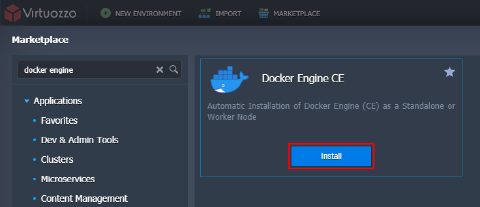
- Docker Engine CE is delivered as the pre-packaged solution available through the platform Marketplace. Use the search field at the top or locate the package under the Dev & Admin Tools category:
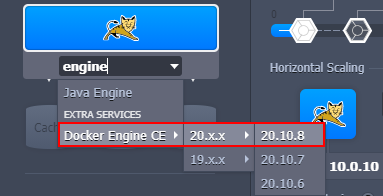
Tip: You can also install Docker Engine CE via the topology wizard - search for the stack or locate manually in the More > Extra Services section.
- In addition to the Docker Version selection, you can choose from several deployment options when installing from Marketplace:
- Create a clean standalone engine - sets up a bare node with just a Docker daemon inside. If needed, you can additionally install Portainer UI - a web-based management tool
- Connect to an existing swarm cluster - automatically includes this new Docker Engine into the existing Docker Swarm cluster (the appropriate cluster’s Join Token and Host IP are required)
- Deploy containers from compose.yml - automatically deploys an application from the linked custom repository
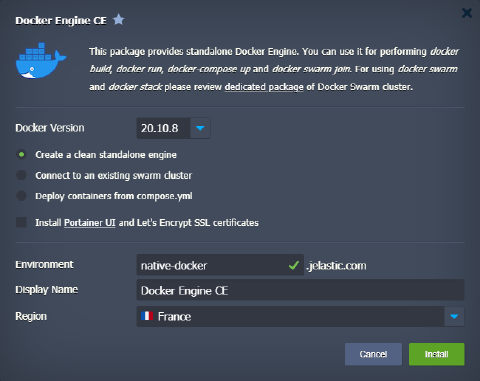 Confirm installation by providing general info (Environment, Display Name, Region) and clicking the Install button.
Learn more about Docker Engine CEinstallation and management via the relevant articles on our blog.