
Redis Overview
This guide is maintained for Ruk-Com PaaS. Screens and options may vary by platform version and account permissions.
Confirm the environment, region and account permissions, and back up current settings before changing a production system.
Redis is an open-source advanced key-value cache and data storage, which provides a heightened durability. It is often perceived as a data structure server, as far as keys can contain different types of data: strings, hashes, lists, sets, sorted sets, bitmaps and hyperloglogs. All of these data elements can be processed with different atomic operations, such as appending to a string, pushing an element to a list, incrementing the value in a hash, getting the member with the highest ranking in a sorted set, etc.
One more important Redis feature is an outstanding performance. It is achieved by means of operating with in-memory datasets. In order to store such a database you can use either dumping to disk every once in a while or appending each command to a log. This persistence can be also optionally disabled, if all you need is just a feature-rich, networked, in-memory cache.
Note: Learn about the changes to Redis licensing and availability.
And now let’s figure out how to get your own environment with Redis data structure server in it just within a few clicks.
Redis Installation
-
Log in to the platform.
-
Click New Environment in the upper left corner.
 3. You’ll see an environment topology wizard opened. Navigate to the tab with the preferred programming language and pick Redis instance from the list of available NoSQL databases. Set the amount of fixed and dynamic cloudlets for it, name your environment, and click the Create button.
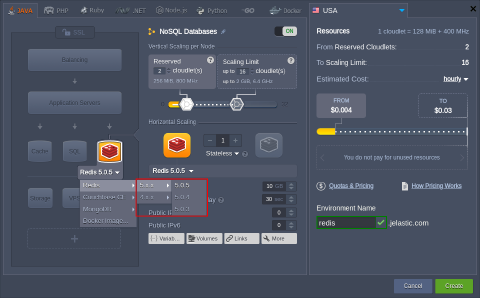 4. After environment is successfully created, you’ll receive an email with your Redis node’s data: DNS address, IP address, port number it can be connected through, and access credentials.
Use this information for making any required configurations and managing your Redis server.