
Ports
This guide is maintained for Ruk-Com PaaS. Screens and options may vary by platform version and account permissions.
Confirm the environment, region and account permissions, and back up current settings before changing a production system.
The Ports tab provides you with a general information on managing container ports at the platform.
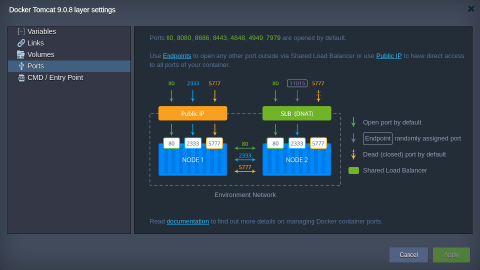 The following ports are opened by default:
- 80, 8080, 8686 - proxies HTTP traffic to HTTP (80 port)
- 4848, 8443, 4901-4910 - proxies SSL (HTTPS) traffic is proxied to SSL
- 443 - proxies SSL traffic is proxied to HTTP (80 port)
- 4949, 7979 - proxies SSL traffic to HTTP
Tip: Use the table below as a reference:
| Port on SLB | Backend Port | Frontend SSL | Backend SSL |
|---|---|---|---|
| 80, 8080, 8086 | 80 | no | no |
| 4848 | 4848 | yes | yes |
| 8443 | 8443 | yes | yes |
| 4901-4910 | 4901-4910 | yes | yes |
| 443 | 80 | yes | no |
| 4949 | 4949 | yes | no |
| 7979 | 7979 | yes | no |
Additional ports can be opened using:
- endpoints - maps the container internal port to random external via the platform Shared LB
- Public IP - provides a direct access to all ports of your container
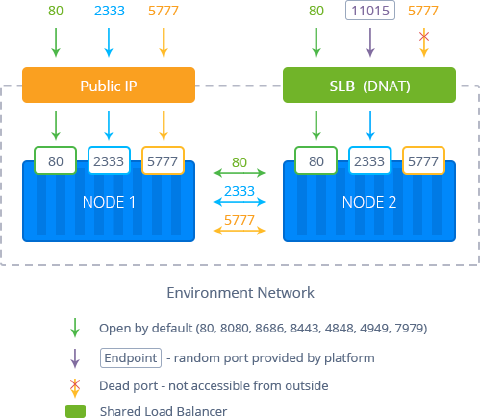 Depending on the way chosen, just bind your service (application listener) to the received internal or external address.
Ports Auto-Redirect
The platform automatically redirects incoming requests to the application hosted within a container.
During a node creation, the platform detects the ports which are listened on the TCP level. The commonly used for standard services (e.g., SSH, mail, databases, etc.) are automatically filtered. The first among the remaining ports becomes the container entry point so that all incoming requests are forwarded to it.
This process is performed on each container launch, so the corresponding application becomes available over the embedded Shared Load Balancer just after being deployed, without any manual intervention required.
However, in case you need to disable or adjust this functionality (e.g., if it exposes application admin panel), you can manually change the auto-redirect settings during the container creation. For that, switch to the Variables section, add the dedicated Ruk-Com PaaS_EXPOSE parameter and set its value based on your needs:
- 0 or DISABLED or FALSE - to disable auto-redirect
- a number within the 1-65535 range - to define a container port, which will receive the incoming traffic (i.e., where it will be redirected to)
- if any other value is stated, the auto-redirect functionality will work as usual
Alternatively, a comma-separated list of ports can be provided via the Ruk-Com PaaS_PRIORITY_PORTS variable. The platform checks them one by one, configuring the entry point redirect to the first active service discovered. This option can speed up container startup time compared to the all ports analysis during the default auto-redirect flow.
Note:
- if the exact port is specified via the Ruk-Com PaaS_EXPOSE variable, the Ruk-Com PaaS_PRIORITY_PORTS is ignored
- if no services are discovered on the Ruk-Com PaaS_PRIORITY_PORTS, the default auto-redirect flow is called
- when working with the NodeJS application server, an additional REDIRECT_EXCLUDE_PORTS variable can be used to manually exclude ports from the auto-redirect algorithm (i.e., port 80 won’t redirect to them)
To get even greater flexibility over the node accessibility, you can customize your container firewall settings.