
Java Options and Arguments
This guide is maintained for Ruk-Com PaaS. Screens and options may vary by platform version and account permissions.
Confirm the environment, region and account permissions, and back up current settings before changing a production system.
In order to ensure cost efficiency, all platform-managed Java servers are automatically configured to utilize memory in the most beneficial way. It is achieved by adjusting the main Java memory parameters based on resources allocated to a container.
The default options can be manually changed to ensure high performance or to support any custom implementation.
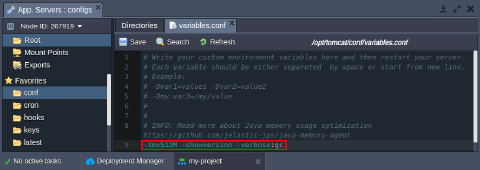
- In order to provide all the preferred Java options at once, the variables.conf file can be utilized.
Depending on a particular application server you are working with, the exact location may vary:
- Tomcat, TomEE - /opt/tomcat/conf/variables.conf
- Jetty - /opt/jetty/etc/variables.conf
- Spring Boot - /opt/shared/conf/variables.conf
- GlassFish - /opt/glassfish/glassfish/domains/domain1/config/variables.conf
- Payara - /opt/payara/glassfish/domains/domain1/config/variables.conf
- WildFly - /opt/wildfly/conf/variables.conf
 If needed, you can redefine the main memory options via container variables.
- Don’t forget to Restart nodes to apply changes.
 That’s it! Now, your application is running with your custom Java options.
Redefining Main Java Parameters
Most of the essential memory parameters (-Xms, -Xmn, -Xmx, -Xminf, -Xmaxf, -XX:MaxPermSize, *-XX:+Use.GC) can be redefined using the dedicated environment variables.
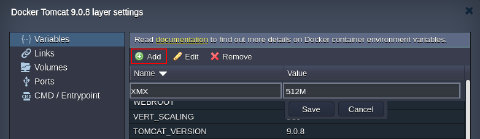
As an example, you can Add the -Xmx option (i.e., maximum size for the Java heap memory):
Tip: The platform supports two additional variables that allow setting up main RAM parameters as a percentage of the total memory available:
- XMS_DEF_PERCENT - the initial size (%) of the memory allocation pool
- XMX_DEF_PERCENT - the maximum size (%) of the memory allocation pool
These values are automatically validated - if XMS is bigger than XMX, its actual value is set equal to XMX.
Spring Boot and Java Engine Specific Variables
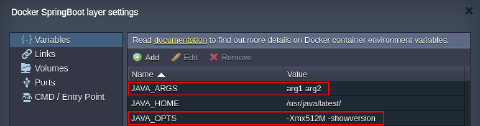
When operating with the Spring Boot and Java Engine templates, you can provide two additional variables:
- JAVA_OPTS - to customize Java options for your app (similar to the variables.conf file)
- JAVA_ARGS - to pass some custom arguments to your application main function
 Don’t forget to restart your application server(s) in order to apply changes.