
Python Connection
This guide is maintained for Ruk-Com PaaS. Screens and options may vary by platform version and account permissions.
Confirm the environment, region and account permissions, and back up current settings before changing a production system.
MySQL, MariaDB, and Percona are widely used open source databases. Follow the instructions below to connect your Python application, hosted on the platform, to one of these database servers:
- Log into the platform dashboard and create a new environment with both an Apache Python (or Python Engine) application server and a MariaDB (or MySQL/Percona) database.
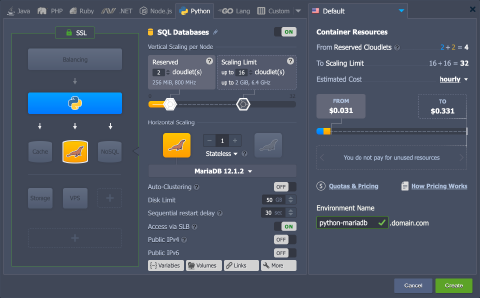
Tip: Placing both nodes in a single environment is only one approach. You can connect environments the same way when they are in separate environments.
- After environment creation, access your application server via SSH. For example, by pressing the Web SSH button.
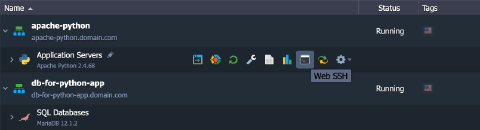 A new tab opens with a terminal and an SSH session to your node.
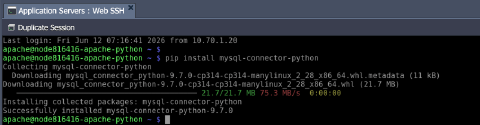
- Now, install a MySQL connector for Python (it works with MariaDB as well) with the following command:
bash Copy
pip install mysql-connector-python
 4. Create a simple Python script to test the database connection. Use your preferred text editor and any filename with a
 .py extension (for example, vim test-db-connection.py).
py Copy
import mysql.connector
from mysql.connector import errorcode
try:
  cnx = mysql.connector.connect(user='{user}', password='{password}',
                                host='{host}', database='{database}')
except mysql.connector.Error as err:
  if err.errno == errorcode.ER_ACCESS_DENIED_ERROR:
    print("Something is wrong with your user name or password")
  elif err.errno == errorcode.ER_BAD_DB_ERROR:
    print("Database does not exist")
  else:
    print(err)
else:
  print("You are connected!")
  cnx.close()
Replace the placeholders with the values from the email for your MySQL/MariaDB/Percona node:
{user}- database username{password}- password for that user{host}- your MySQL/MariaDB/Percona container hostname{database}- target database (for example, the defaultmysqldatabase)
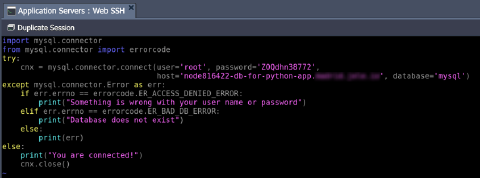 The script connects to the specified database server with the provided credentials and prints “You are connected!” if the connection succeeds. Otherwise, it prints the error description.
- Run the script:
bash Copy
python test-db-connection.py
 If
If You are connected! appears in the terminal, the connection succeeded. You can extend the script to run queries and other database operations.