
PHP Auto-Configuration
This guide is maintained for Ruk-Com PaaS. Screens and options may vary by platform version and account permissions.
Confirm the environment, region and account permissions, and back up current settings before changing a production system.
The platform dynamic resources optimization complements the basic implementation provided by PHP servers to bring maximum efficiency. Basically, upon changing the amount of allocated RAM and CPU resources (cloudlets count), the platform automatically adjusts the appropriate PHP directives to fit the new conditions. However, if needed, you can disable automatic configuration and provide parameters manually within your server’s configuration file.
Auto-Configuration Example
Let’s check how the parameters are changed based on the allocated resources.
- For example, we have an environment with the Apache PHP application server inside (16 cloudlets).
The values of the prefork module configs in the /etc/httpd/conf/httpd.conf file are as follows:
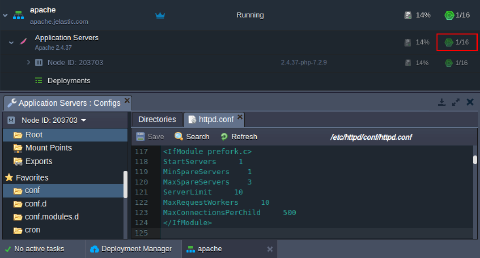 2. Now, if we set a new resource limit for the Apache PHP server (32 cloudlets) and refresh the /etc/httpd/conf/httpd.conf file:
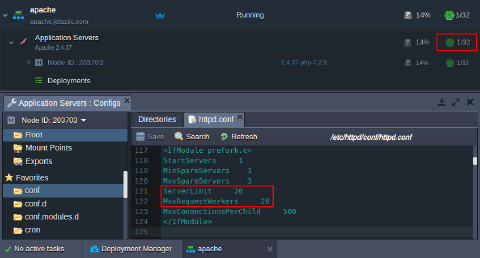 As you can see, the directive values are adjusted automatically due to the changed amount of available resources.
The same principle is applied to all other PHP application servers.
Disable Automatic Optimization
To state your custom values instead of the automatically configured directives, you need to disable the automatic optimization. Otherwise, your custom changes will be reverted during the container restart/update.
Tip: You can use the PHP_MEMORY_LIMIT and PHP_MAX_EXECUTION_TIMEvariables to set the PHP memory limit and maximum execution time without disabling the automatic optimization.
Currently, you need to perform the following actions based on your PHP application server type:
Note: Inappropriate directive values may cause your server instability, so it isn’t recommended to apply any manual changes unless you know exactly what you are doing.
Smart Auto-Configuration
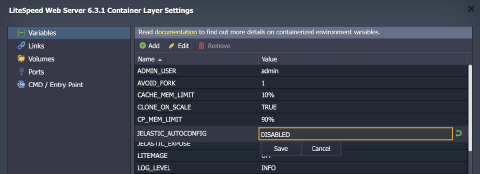
If you want to manually change any of the auto-configured settings, you need to set the Ruk-Com PaaS_AUTOCONFIGenvironment variable to false (disabled).
Legacy Implementation
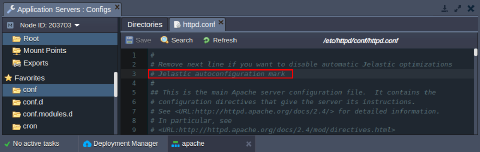
Remove a line with the optimization mark at the beginning of the appropriate configuration file:
- Apache PHP - “# Ruk-Com PaaS autoconfiguration mark” within the /etc/httpd/conf/httpd.conf file
 * NGINX PHP - “; Ruk-Com PaaS autoconfiguration mark” within the /etc/php-fpm.conf file
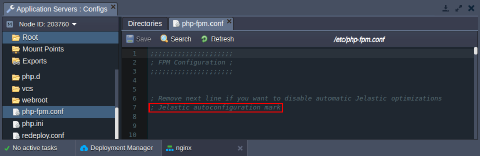 After the corresponding string is deleted, the parameters’ values won’t be auto-configured by the platform optimization mechanism so that you can state your custom parameters. Don’t forget to Save the file to apply the new configurations.
Auto Adjustable Settings
The type of basic requests’ handling and dispatching system varies for different PHP application servers, so the directives they use are different too. However, the functionality of such parameters could be similar. To learn more about these directives for a particular application server, navigate to the corresponding section below:
Apache PHP
Dynamic request handling in Apache PHP is implemented with the help of the prefork Multi-Processing Module (MPM), which helps to reveal full server potential. The MPM directives are listed in the main Apache /etc/httpd/conf/httpd.conf configuration file.
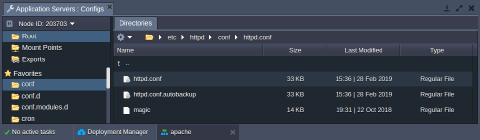 Here is a complete list of parameters, which the platform configures for the prefork module:
- StartServers - sets the number of child server processes created on startup.
- MinSpareServers (MaxSpareServers) - defines the minimum (maximum) number of server processes that are kept spare
- ServerLimit - sets the highest allowed value for the MaxRequestWorkers directive
- MaxRequestWorkers - configures the limit of simultaneous requests to be processed
- MaxConnectionsPerChild - defines the number of requests a single child process can serve
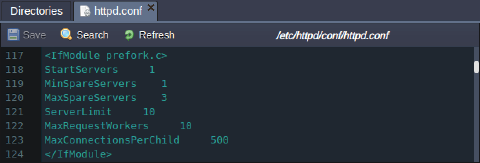 Based on the allocated resources (i.e., a number of dynamic cloudlets reserved for the Apache PHP server) and capacity of the CPU provided by your particular hosting provider, the platform automatically adjusts the ServerLimit and MaxRequestWorkers parameters:
MaxRequestWorkers = ServerLimit = min( {containerRam} / 30MiB, {coresCount} * 5 )
Due to this statement, both directives are stated equal to the lower value between:
- allocated to the node amount of RAM, divided by 30
- cores number of the hoster’s physical server the container is placed at, multiplied 5 times
In such a way, parameters are dynamically changed based on the number of allocated cloudlets but won’t grow over the hardware limits.
Note: If you’d like to state your custom value for these directives, be aware that incorrect values can cause your Apache PHP server instability:
- If ServerLimit is much higher than necessary, the unused shared memory is allocated; while stating a parameter too low won’t reveal the full server performance potential.
- MaxRequestWorkers should be big enough to handle as many simultaneous requests as you expect to receive and small enough to ensure that there is enough RAM.
NGINX PHP
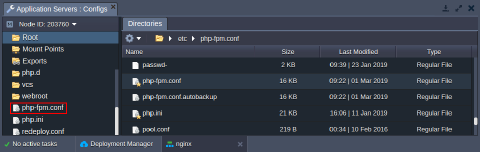
Request handling in the NGINX PHP application server is managed by FastCGI Process Manager (FPM), which can be configured via the /etc/php-fpm.conf file. It is automatically added to the favorites list in the container file manager for quick access:
 The FPM works in the ondemand mode (the pm directive) by default. It spawns new processes when needed (i.e., on demand) and removes idle ones. The only additional parameters for this mode are:
- pm.max_children - defines the maximum number of child processes (equal to the number of CPU cores available for the container, but no less than 2)
Tip: The exact value depends on the CPU capacity provided by your particular hosting provider and the number of allocated cloudlets for your container. In such a way, cloudlet count enlargement results in the automatic growth of the pm.max_children parameter.
This directive can be defined explicitly without disabling the automatic optimization through the appropriate PHPFPM_MAX_CHILDRENvariable.
- pm.process_idle_timeout - sets the delay before killing an idle process (60 seconds)
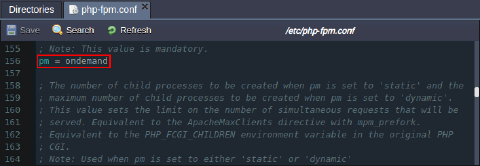 Also, to gain advanced performance, the PHP FPM listener utilizes the UNIX domain socket instead of the common TCP one. Such a solution is better suited for communications within the same host, allowing the skip of checks and operations (like routing).
LiteSpeed (LLSMP)
The platform automatically optimizes the LiteSpeed worker processes count based on the allocated RAM and number of CPU cores. The Ruk-Com PaaS_AUTOCONFIGenvironment variable defines if the auto-configuration feature should be enabled (true, by default) or disabled (false).
Refer to the LiteSpeed Web Server guide for more details.