
Failover Routing for Traffic Distributor
This guide is maintained for Ruk-Com PaaS. Screens and options may vary by platform version and account permissions.
Confirm the environment, region and account permissions, and back up current settings before changing a production system.
Objective
This guide explains how to use Failover Routing for Traffic Distributor on Ruk-Com Cloud PaaS, with ordered procedures and practical verification points.
Before you begin
- Sign in with an account permitted to manage the relevant environment.
- Confirm the target environment, region and resources before saving changes.
- Create a backup or rollback plan before changing a production system.
Failover is a special routing method used to protect a project by keeping a fully functional copy of the environment as a backup. That is, you have a primary server and a backup server - all requests are routed to the first backend, while the second is on standby and is only used if the primary server goes down.
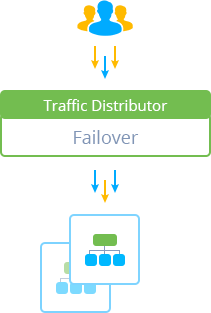
For this type of traffic distribution, it is obvious that you cannot set different distribution ratios from 100 to 0. You can choose which server is the primary and backup server. Thanks to this section, all incoming requests are routed to one server - either to the main server or to the secondary server in case of unavailability and search for backends inenvironment regionsDifferentiation helps prevent hardware-dependent failures easily.
Basically, your customer requests are automatically redirected to the running server. Therefore, even in the event of failure The user will not notice any interruptions in the operation of the application.