
PHP Versions
This guide is maintained for Ruk-Com PaaS. Screens and options may vary by platform version and account permissions.
Confirm the environment, region and account permissions, and back up current settings before changing a production system.
Within the confines of PHP hosting at the platform, the following PHP engine versions are supported:
- PHP 8.1.33
- PHP 8.2.33
- PHP 8.3.33
- PHP 8.4.25
- PHP 8.5.10
The up-to-date list of the releases available on the platform is provided via the dedicated, regularly (weekly) updated Software Stack Versions document.
You can choose the version you need while environment creation and easily switch between them afterwards via topology wizard. The workflow is the following:
- Click the New Environment button at the top dashboard pane to open the Environment Wizard frame.
 2. Navigate to the PHP language tab and pick the preferred application server. Choose the desired engine version by means of the second drop-down list in the central pane.
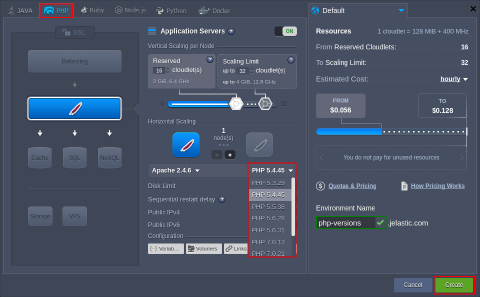 Specify the resource limits, select the preferred region, type your environment name (or leave the default one) and click the Create button.
Tip: For more information on PHP hosting specifics at the platform and the possibilities it provides, refer to the PHP Developer’s Center document.
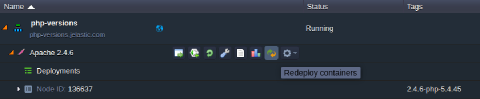
- In order to change the version of PHP for the already existing environment, click the Redeploy containers icon next to the appropriate layer.
 4. Select required engine version within the Tag list of the opened frame.
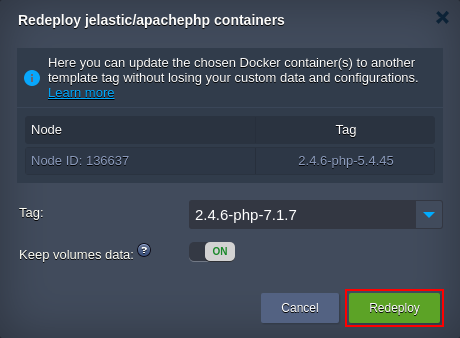 Click Redeploy to confirm the changes.
Note: If switching to PHP 7 from older versions, you may need to manually activate certain PHP modules, as some of them were turned into dynamic ones (i.e., to be activated only upon the necessity).