
Helm Integration
This guide is maintained for Ruk-Com PaaS. Screens and options may vary by platform version and account permissions.
Confirm the environment, region and account permissions, and back up current settings before changing a production system.
Kubernetes Cluster: Helm Integration
Kubernetes provides multiple options to deploy applications. One of the most common methods is to use the Helm package manager. If you are looking to run a popular or any relatively known solution in your Kubernetes cluster, most likely it can be found as a pre-configured package that can be installed in a matter of minutes. Helm helps you install Kubernetes applications from remote repositories as well as create local Helm charts.
Helm is available on all control plane nodes of the Kubernetes Cluster by default and requires no additional configuration. Just connect to the node (e.g., via Web SSH), and you can start working with Helm. The package manager version is automatically updated during the Kubernetes Cluster upgrades.
Helm works with three big concepts:
- A Chart is a Helm package that contains all of the resource definitions necessary to run an application, tool, or service inside a Kubernetes cluster.
- A Repository is a place where charts can be collected and shared.
- A Release is an instance of a chart running in a Kubernetes cluster. One chart can be installed many times into the same cluster (with its own unique release name), e.g., several database instances.
Helm installs charts into Kubernetes, creating a new release for each installation. And to find new charts, you can search Helm chart repositories.
In this guide, we’ll cover all the main stages of working with Helm:
- searching for charts and working with repositories
- installing new Helm applications
- managing existing applications
Tip: Helm is useful not only for its ready-to-use solutions, but also as a versioning and standardization tool for project development. At first, when you are working on a small project, the scripted deployment approach can be enough for your needs. However, the complexity can rump up pretty quickly, requiring more and more adjustments to your YAML files. For example, even deploying into staging and production environments requires tweaks like database URLs.
At some point, you may feel that it’s hard to keep track of the interaction and dependencies of the components. Usually, this means that your environment’s complexity is outgrowing your custom deployment scripts. In such a situation, it might be a good time to consider Helm as a potential solution that will replace your homegrown scripts. The Chart Development Guide will explain how to develop your own charts.
Finding Helm Charts
There are a lot of pre-configured solutions that can be installed inside the Kubernetes Cluster in a matter of minutes. Helm package manager has a central hub with a lot of ready-to-use solutions. Also, you can work with custom repositories.
Helm comes with a powerful helm search command that can be used to search two different source types:
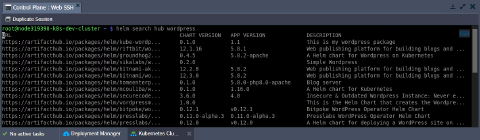
helm search hubsearches the Artifact Hub (distributed community Helm chart repository), which lists helm charts from dozens of repositories
For example, you can find all publicly available charts for WordPress by running:
sh
helm search hub wordpress
 *
* helm search repo searches the repositories you have added to your local helm client (with helm repo add). This search is done over local data, and no public network connection is needed
Helm 3 (used since Kubernetes 1.18.10) no longer ships with a default chart repository. You can use the helm repo commands to add, list, and remove repositories. For example, let’s add popular Bitnami repositories:
sh
helm repo add bitnami https://charts.bitnami.com/bitnami
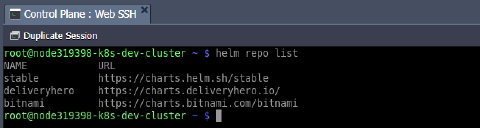
 You can see which repositories are configured using the
 helm repo list command:
sh
helm repo list
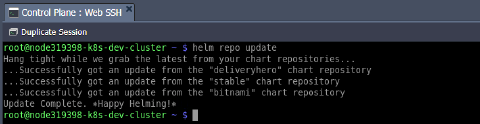
 Because chart repositories frequently change, you can make sure your Helm client is up to date by running:
sh
helm repo update
Installing Helm Package
To install a new package, use the helm install command. At its simplest, it takes two arguments:
- {name} - a release name that you pick (e.g., mywordpress)
- {chart} - the name of the chart you want to install (e.g., bitnami/wordpress)
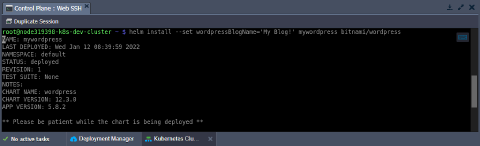
Additionally, you can provide chart options to customize the application (see more details in the managing Helm section). For example, let’s change the blog name with the --set wordpressBlogName='My Blog!' parameter.
sh
helm install --set wordpressBlogName='My Blog!' mywordpress bitnami/wordpress
 Installing a chart creates a new release object. If you want Helm to generate a name for you, leave off the release name and use the
 --generate-name parameter.
During installation, the helm client will print useful information about created resources, release state, and any additional configuration steps. Let’s follow the steps to ensure that our WordPress instance is working fine.
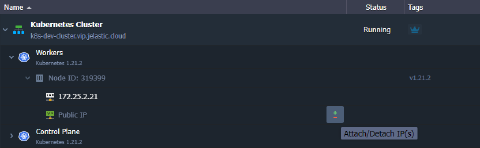
Tip: By default, the Helm WordPress application creates a LoadBalancer service that processes all traffic from the attached public IP. When there is only one public IP address in the Kubernetes cluster (as in the development setup) and access via SLB is disabled, pre-installed applications with configured ingress controllers will be unavailable. In such a case, the most straightforward option is to add another public IP to the worker container (in addition to the first, which is already used by the WordPress LoadBalancer service) and access the configured ingresses using it.
Alternatively, one more worker node with a public IP can be added to the Kubernetes cluster.
In both cases, pre-installed applications will be available by the second public IP.
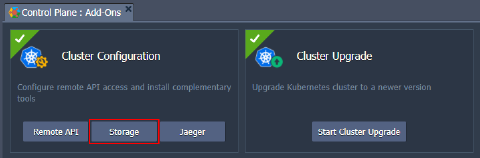
Note: WordPress is a rather complex solution that requires additional components such as Storage and public IP. If not provided during the Kubernetes Cluster installation, you can add them via the platform dashboard.
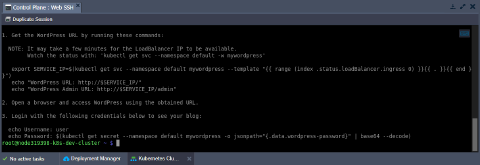
Get the WordPress URL and admin credentials by running the commands below:
sh
export SERVICE_IP=$(kubectl get svc --namespace default mywordpress --template "{{ range (index .status.loadBalancer.ingress 0) }}{{ . }}{{ end }}")
printf "WordPress URL: http://$SERVICE_IP/\nWordPress Admin URL: http://$SERVICE_IP/admin\nUsername: user\nPassword: $(kubectl get secret --namespace default mywordpress -o jsonpath="{.data.wordpress-password}" | base64 --decode)\n"
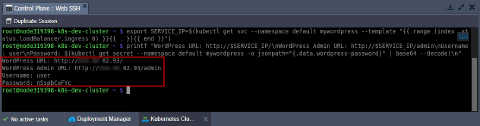 Now, use the obtained data to access your WordPress site and admin.
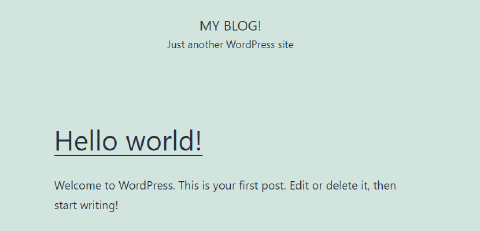
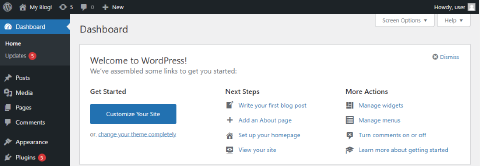 As you can see, our custom blog name (My Blog!) provided via the
 --set parameter is automatically applied.
Managing Helm Applications
Helm provides several commands to work with installed charts. The list of actions includes release upgrade and recovery, status and values check, etc.
Tip: For more information on commands, take a look at Helm’s built-in help - helm help.
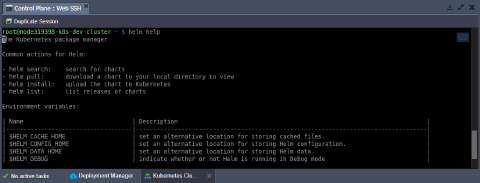 To see a description of a specific command and its flags, run
 helm {command} --help.
- To keep track of a release’s state or to re-read configuration information, you can use the
helm statuscommand:
sh
helm status mywordpress
 2. Often, you will want to customize the chart to use your preferred configurations. It can be done by providing the required values via either the
 --values (-f***) or --set flags during installation and upgrade procedures. The former one passes custom values in a separate YAML file, while the latter one - directly from the command line (e.g., --set a=b,c=d or --set outer.inner=value).
You can specify these flags multiple times with --set having higher precedence. In case of contradiction, the priority goes to the last (right-most) override.
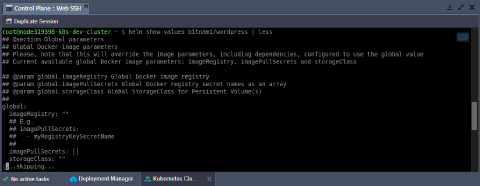
Tip: You can check the default list of values for the package with the following command (the less utility helps navigate through the response conveniently):
sh
helm show values bitnami/wordpress | less
- You can use the
helm upgradecommand to upgrade the release to a new chart version or change your release’s configuration. During the procedure, the Helm tries to perform the least invasive upgrade by updating only things that have been changed since the last release.
Tip: If needed, you can use the upgrade command with the --reset-values flag to reset any custom values and use the ones built into the chart.
Due to the specifics of our WordPress chart from the installing section, you must provide current passwords when upgrading the release. Let’s add these values into corresponding variables for convenience:
sh
export WORDPRESS_PASSWORD=$(kubectl get secret --namespace "default" mywordpress -o jsonpath="{.data.wordpress-password}" | base64 --decode)
export MARIADB_ROOT_PASSWORD=$(kubectl get secret --namespace "default" mywordpress-mariadb -o jsonpath="{.data.mariadb-root-password}" | base64 --decode)
export MARIADB_PASSWORD=$(kubectl get secret --namespace "default" mywordpress-mariadb -o jsonpath="{.data.mariadb-password}" | base64 --decode)
Now, you can provide passwords via the --set flag:
sh
helm upgrade --set wordpressPassword=$WORDPRESS_PASSWORD,mariadb.auth.rootPassword=$MARIADB_ROOT_PASSWORD,mariadb.auth.password=$MARIADB_PASSWORD mywordpress bitnami/wordpress
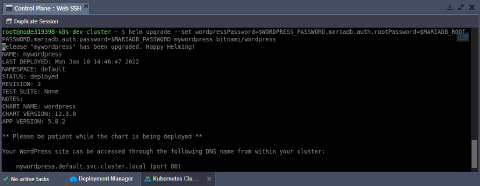
Tip: When you need to provide a lot of custom parameters, it may be more convenient to specify them in a separate YAML file.
For the WordPress example, you can prepare the following values-template.yaml file:
yaml
wordpressPassword: %WP_PASS%
mariadb:
  auth:
    rootPassword: %DB_ROOT_PWD%
    password: %DB_PWD%
Then you can just replace the placeholders with the actual password values (which were exported to the variables in this step before).
sh
cat values-template.yaml | sed "s/%WP_PASS%/$WORDPRESS_PASSWORD/g" | sed "s/%DB_ROOT_PWD%/$MARIADB_ROOT_PASSWORD/g" | sed "s/%DB_PWD%/$MARIADB_PASSWORD/g" > values.yaml
Then you can pass the file with the required configs (values.yaml) in the helm upgrade or helm install commands with the --values (-f) flag. Such simple steps will spare you of the necessity to specify passwords manually for each WordPress upgrade operation.
sh
helm upgrade -f values.yaml mywordpress bitnami/wordpress
- The
helm getcommand is a helpful tool for looking at a release in the cluster. For example, to see values used to generate the release:
sh
helm get values mywordpress
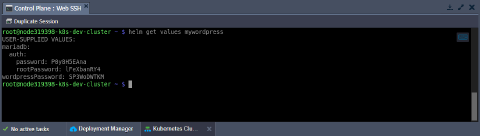 As you can see, our password values persist through the upgrade.
- Also, it is easy to roll back to a previous release if something does not go as planned.
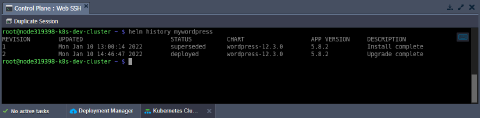
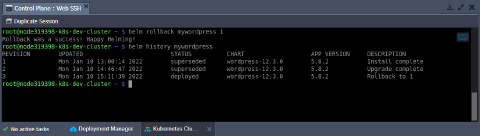
The appropriate helm rollback command requires two parameters - the name of the target release and a number of the necessary revision. Initial installation is always the first revision. This number is incremented by one for each install, upgrade, or rollback operation.
Tip: You can use helm history to see revision numbers for a specific release.
sh
helm history mywordpress
sh
helm rollback mywordpress 1
 6. To uninstall a release from the cluster, use the following command:
sh
helm uninstall mywordpress
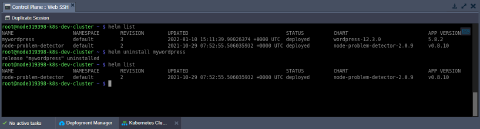
Tip: If you wish to keep a deletion release record, use the --keep-history flag.
After removal, you can check your currently deployed releases with the helm list command.
That’s all the basics of working with the Helm package manager for Kubernetes.