
Apache Statistics Module
This guide is maintained for Ruk-Com PaaS. Screens and options may vary by platform version and account permissions.
Confirm the environment, region and account permissions, and back up current settings before changing a production system.
The statistics (or status) module provides an interface to view your server’s statistics.
Enabling statistics module
In the platform, the statistics module is disabled by default. You can activate this module following the instruction:
- Click Config button for your Apache server.
- The required status_module is loaded by default, so navigate to the /etc/httpd/conf folder and open the httpd.conf file. Add the following code:
apache Copy
ExtendedStatus On
<Location /statistics/>
SetHandler server-status
####### Security configuration ####################
####### Basic auth config should follow here ######
###################################################
</Location>
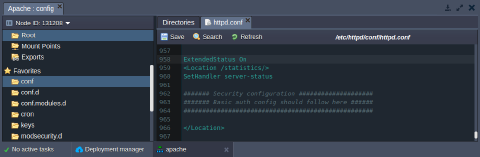 Note: you can use any other context for your statistics location (in our case we have /statistics/).
* Save the changes and restart Apache.
* Click Open in browser. Add the location name to the link.
Note: you can use any other context for your statistics location (in our case we have /statistics/).
* Save the changes and restart Apache.
* Click Open in browser. Add the location name to the link.
http://{env_name}.{hoster_domain}/{location_name}/
In the opened window the statistics of the server will be shown.
Setting up security configuration
- Generate hash from your password. For that you can use any htpasswd tool or online service (for example, http://www.htpasswdgenerator.net/).
- Create simple text file with previously generated hash.
- Click Config button for your Apache server.
- Upload the created file to the /var/www/webroot/ROOT folder.
- In the /etc/httpd/conf folder open the httpd.conf file.
Instead of:
apache Copy
####### Security configuration ####################
####### Basic auth config should follow here ######
###################################################
Add the following code:
apache Copy
AuthName "Statistics area"
AuthType Basic
AuthBasicProvider file
AuthUserFile /var/www/webroot/ROOT/.htpasswd
Require valid-user
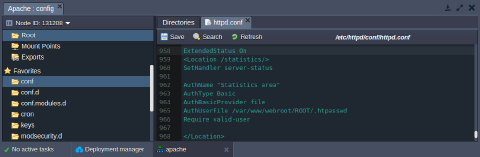 * Save the changes and restart Apache.
* Click Open in browser. Add the location context to the link.
http://{env_name}.{hoster_domain}/{location_name}/
* Save the changes and restart Apache.
* Click Open in browser. Add the location context to the link.
http://{env_name}.{hoster_domain}/{location_name}/
In the opened window you’ll be requested to log in with your credentials. Use the credentials you stated while generating the hash to see the statistics of the server.