
Overview
This guide is maintained for Ruk-Com PaaS. Screens and options may vary by platform version and account permissions.
Confirm the environment, region and account permissions, and back up current settings before changing a production system.
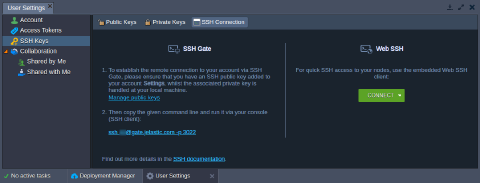
The platform supports access via SSH in one of the following ways:
-
Web SSH - An access to a separate node within your environment, which is based on the user’s session; connection is initiated upon clicking the Web SSH button next to the desired environment in dashboard (which allows to connect from anywhere over Internet, using just a browser).
-
SSH Gate - Such connection type is based on the SSH key pair usage and allows access to either whole PaaS account or just a particular container; it provides the substantial level of security, connecting only instances with private SSH key that matches the appropriate public key, stored within your Platform account settings.
 After accessing node via SSH using any of the above-described methods, you can start managing your container.