

YOUR CLOUD TEAM
Ruk-Com Cloud
Choose the applications you like. Ruk-Com can help plan the stack and starting point for your workload.
Always in your favoritesRUK-COM CLOUD PAAS / BUILD · DEPLOY · SCALE
Build and operate a full stack in one GUI. Keep a familiar runtime and scale your application within the limits you set.
Route requests to available app nodes

Scale CPU / RAM and container count with demand
 Database ClusterMariaDB Galera
 Cache + SentinelCustom deployment
Separate database and cache · add scheduled backups
 PHPNode.js
 .NET Core
 Python
 Ruby
RubyPlace load balancers in a pair with health checks and a failover-capable entry point, then distribute requests across replicas of the same application.
Choose NGINX or HAProxy for your topology.
Choose PHP, Node.js, .NET Core, Python or Ruby. Set reserved resources, scaling limits and node counts in the GUI.
Docker is another option for teams with ready-to-deploy images.
This example uses three MariaDB Galera nodes and Redis primary / replica with three Sentinels.
Redis Sentinel is a deployment pattern to configure for the selected version and package. Backups use a separate schedule and storage.
01 / A CLEARER WAY TO RUN YOUR APPLICATION
Start with the right topology, runtime and region. Configure connectivity, resources and deployment in the GUI, so developers and operations share the same view.
Firewall rules · SSL · access permissions
Choose PHP, Node.js, .NET Core, Python or Ruby, add the load balancer, database and cache you need, and set cloudlets and node counts.
Deploy from Git, archives or a Docker image to match your team’s workflow.
Manage environment variables, configuration, ports / endpoints and volumes with dashboard tools. Connect services through the environment’s private network.
Network Isolation and Firewall depend on the provider and container type; plan VPC connectivity with Ruk-Com for your existing systems.
Inspect logs and metrics by layer, configure alerts and auto scaling for CPU, RAM, network or disk, and choose an enabled environment region.
Review hourly rates before growing the system.
PLATFORM IN PRACTICE
Preview the dashboard, topology and marketplace. Select any screenshot to view it in detail.
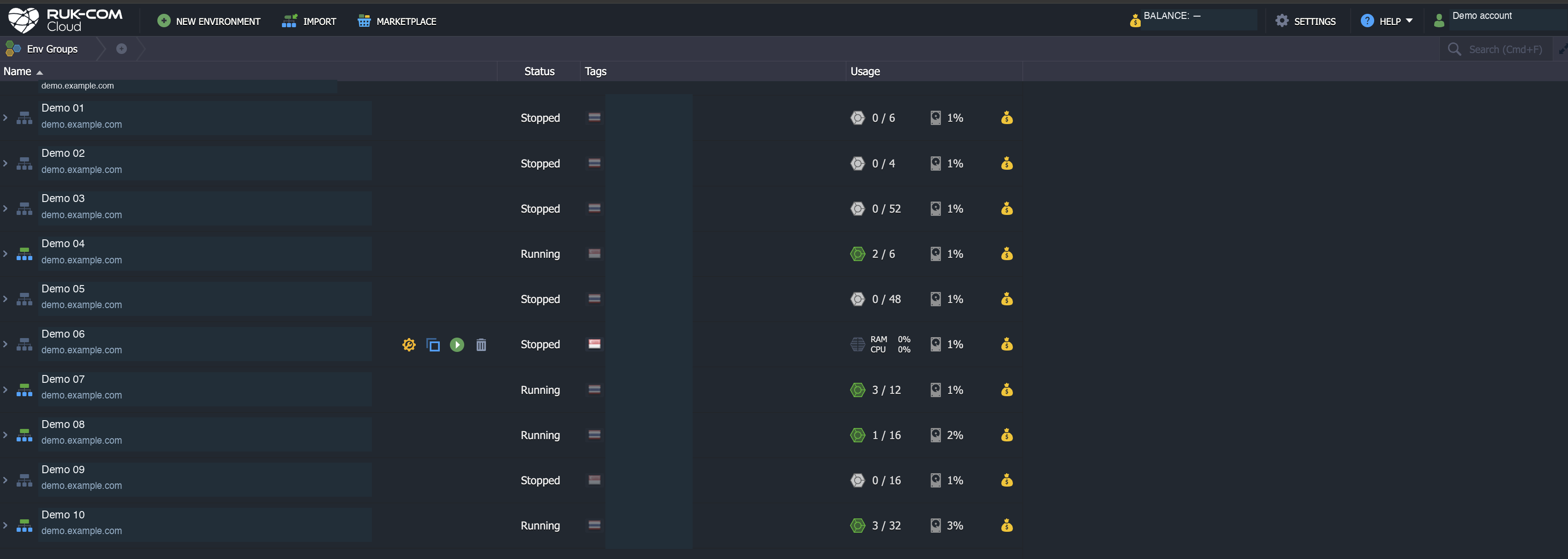
Review environment status and resource usage in one place.
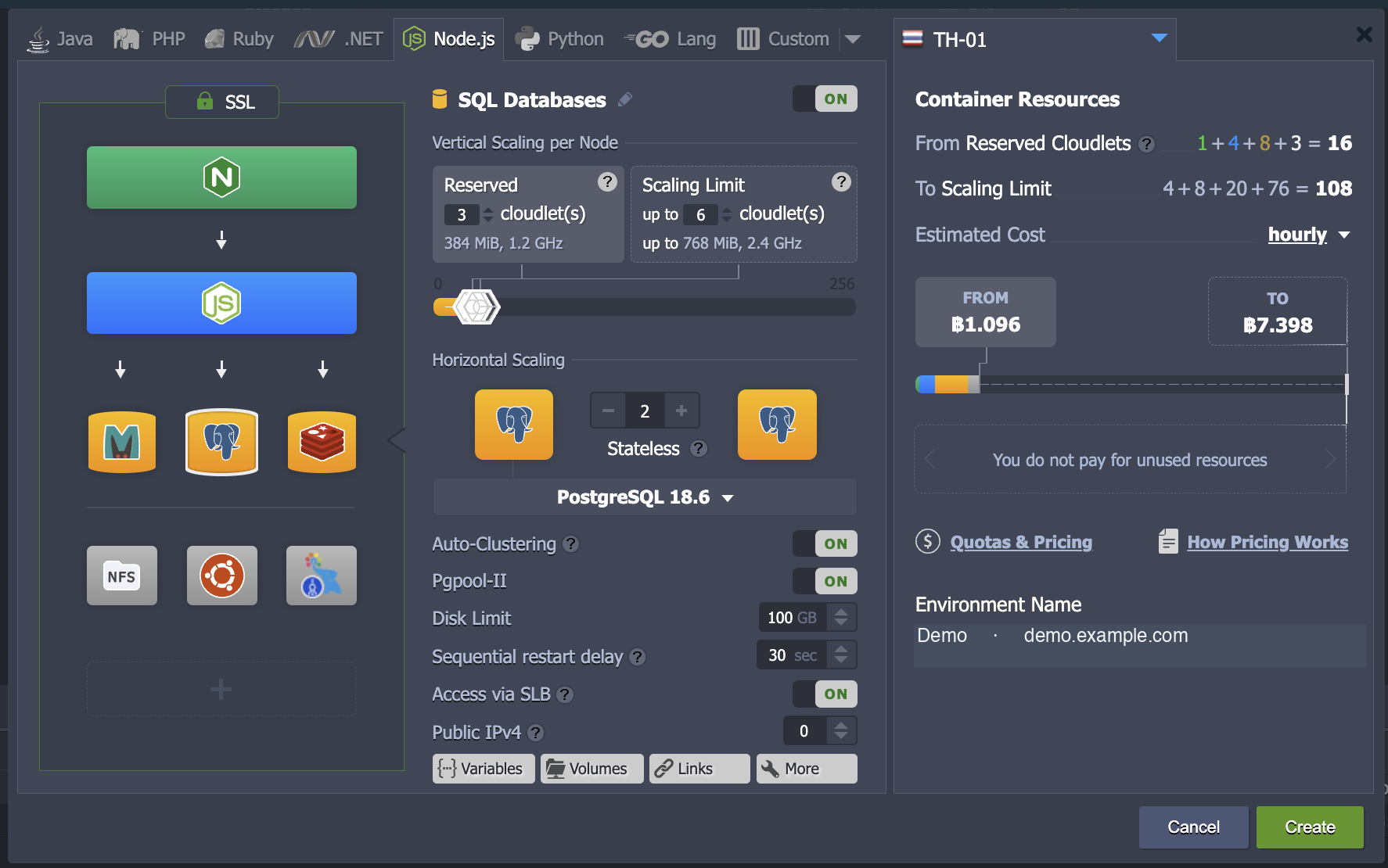
Choose stack components, reserved cloudlets and scaling limits.
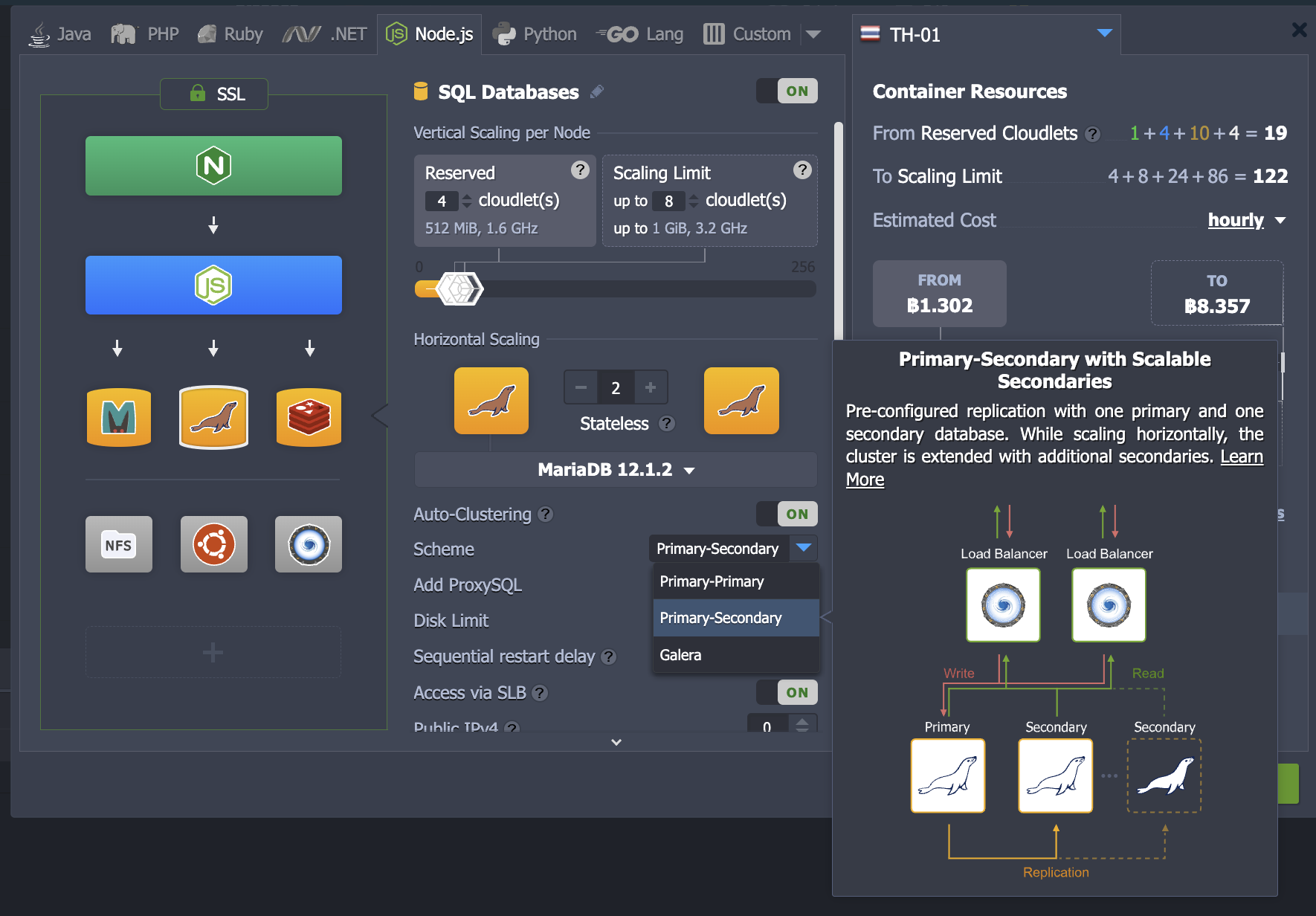
Explore replication options and secondary scaling for the database layer.
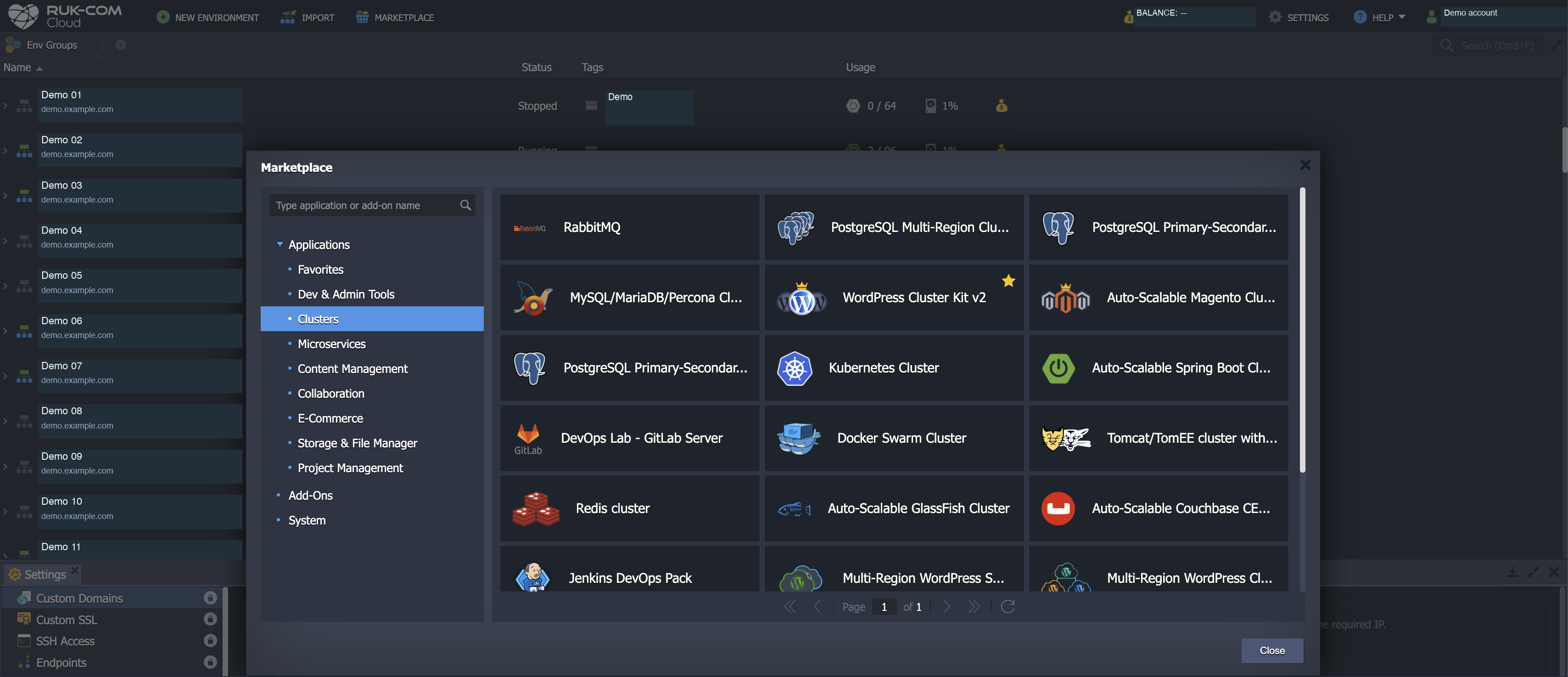
Browse application and cluster categories from the dashboard marketplace.
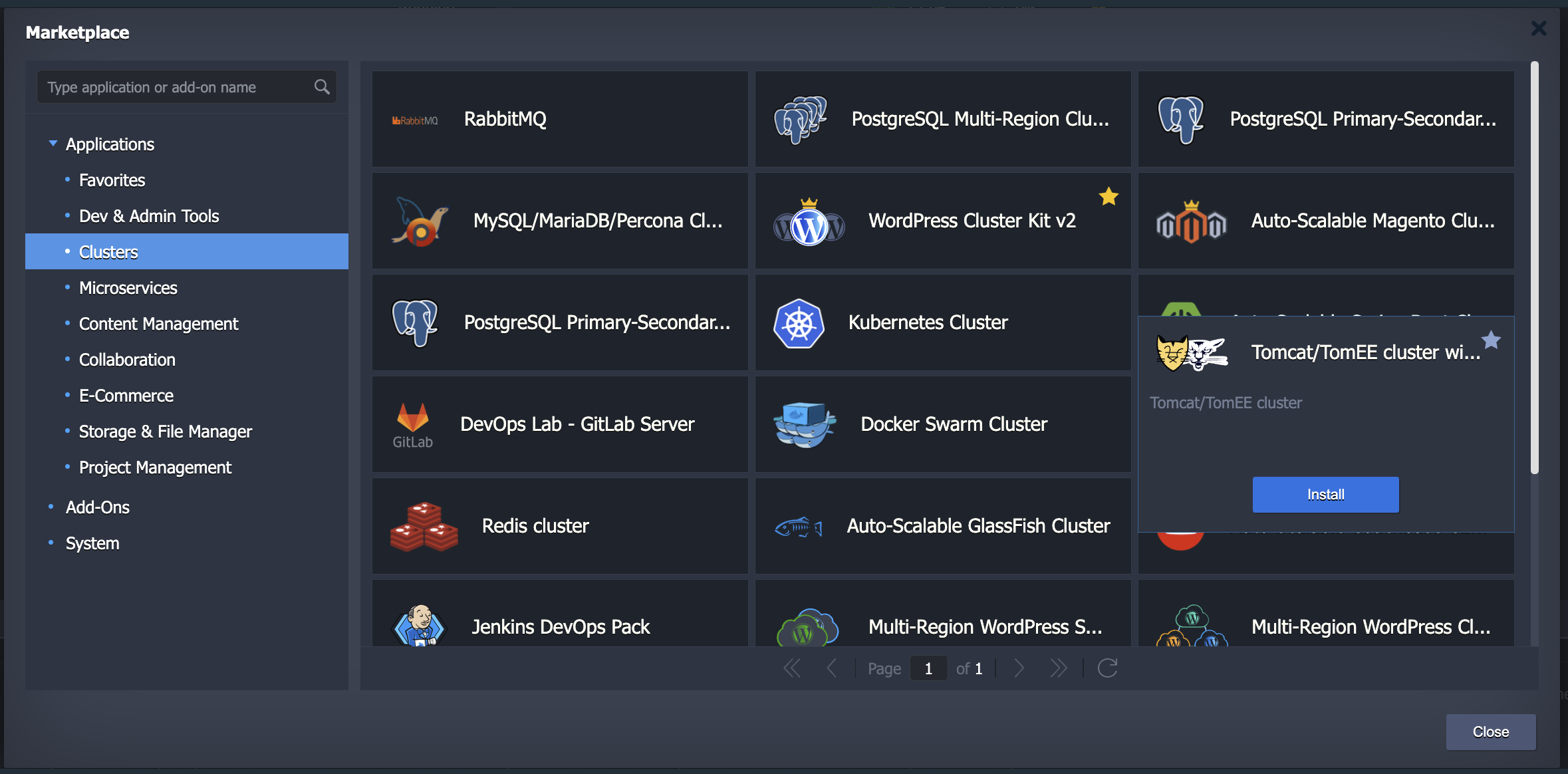
Review available templates and their details before installation.
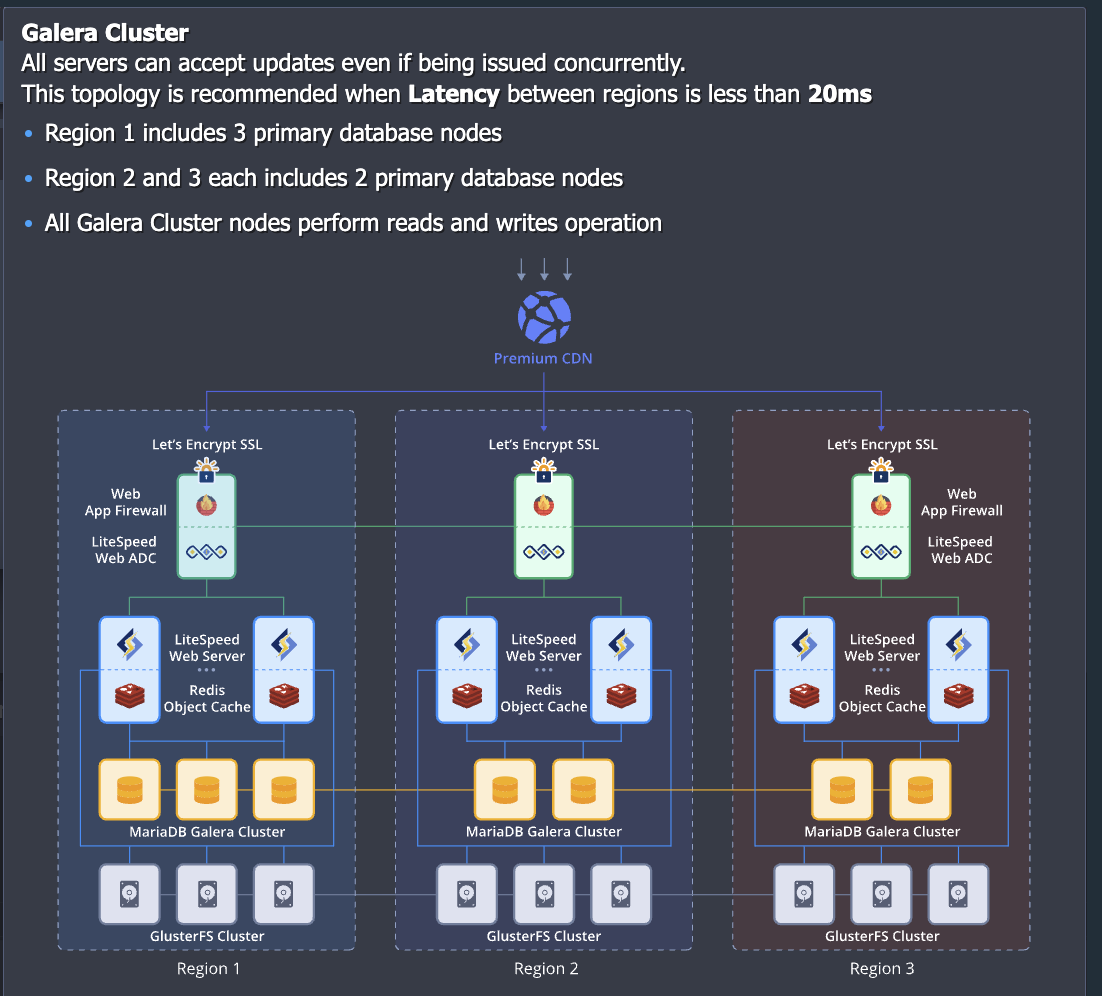
Review template components and network requirements when planning deployment.
Actual screenshots with identifying details replaced by demo data and account details removed. Prices, versions and options shown are illustrative and depend on configuration, region and enabled services.
02 / GROW WITH YOUR WORKLOAD
Use the GUI to configure vertical scaling for CPU / RAM inside a container and horizontal scaling for replicas of the same application. Set limits and triggers to match your workload.
Reserved resources are booked and billed; dynamic resources follow actual use up to each node’s scaling limit.
This applies to application, database, balancer and cache layers.
Choose CPU, memory, network, disk I/O or IOPS triggers, an averaging period and node boundaries.
Nodes that clone state can take longer to scale than stateless applications.
Size reserved resources and limits, test triggers and allow headroom.
Manually changing the scaling limit of an existing app, database or cache layer can restart that layer, so plan the change.
03 / DATABASES + CACHE, WITH THE RIGHT TOPOLOGY
Choose SQL, NoSQL, search and cache services. Each engine has its own replication, clustering and failover model. Plan the data layer independently from app container counts, with backups alongside it.
MariaDBMySQL / PostgreSQL use their own replication models, with failover configured for the selected topology
 OpenSearch
Choose your version and deployment route. Newer releases use custom Docker with a self-managed replica set
RedisReduce repeat queries for data that can be rebuilt. Design the application to handle cache misses
MySQL offers primary-primary / primary-secondary; MariaDB includes Galera and Percona includes XtraDB.
PostgreSQL uses asynchronous primary-secondary replication, with Pgpool-II for automatic failover in that template. Check node counts and enabled versions in the dashboard.
Use OpenSearch for distributed search or Couchbase with scaling and rebalancing.
For MongoDB, choose the deployment route for your version: MongoDB 4.0.4 and later use self-managed custom Docker rather than the certified managed stack, so plan replica sets and operations accordingly.
Redis Sentinel uses a Sentinel quorum to monitor and select a primary in a configured deployment; it is separate from sharded Redis Cluster. Redis 7.4 and later use self-managed custom images.
Memcached is a non-replicating cache, not durable HA storage: keep source data in a database and configure backups separately.
04 / FAMILIAR TOOLS, CONNECTED
Choose a prepared runtime and deploy your code, or use a Docker image if your team already has a container workflow. Select databases and caches independently for your data and availability needs.
PHPNode.js.NET CorePythonRuby Java
Java GoNGINX
 HAProxy
 Apache
 Tomcat
 MySQL
MySQL PerconaMariaDB
 PostgreSQL
 MongoDBOpenSearch
 CouchbaseRedis Sentinel
 Memcached
 Git
Git Docker
 Jenkins
 WordPress
Enabled stacks and templates depend on the region / provider. Redis 7.2.x remains a certified stack. MongoDB 4.0.4 and later and Redis 7.4 and later use self-managed custom Docker / images. Check certified-stack versions and automation in the dashboard. Redis Sentinel is a deployment pattern to configure, distinct from Redis Cluster.
05 / MARKETPLACE · READY-MADE APPLICATIONS
Explore packages for websites, online stores, databases and DevOps. Marketplace templates help create application stacks and supported cluster topologies. Start in the UI, then adapt the environment to your workload.
All examples are listed below. Enable JavaScript to search, filter categories and keep favorites, or browse the actual platform catalog.
79 entries
YOUR CLOUD TEAM
Choose the applications you like. Ruk-Com can help plan the stack and starting point for your workload.
Always in your favoritesAPPLICATION / NEW ENVIRONMENT
Build WordPress sites with a scalable application and database stack.
WordPress · PHP · SQL
Set nodes, caching and database topology for the enabled template. Test site plugins, sessions and backups.
Upstream package details — WordPress Cluster Kit v2APPLICATION / NEW ENVIRONMENT
Choose an SQL engine and replication topology for your app.
SQL · replication options
Options differ by engine. Primary–secondary replication does not guarantee automatic failover; check the selected topology.
Upstream package details — MySQL / MariaDB / PerconaAPPLICATION / NEW ENVIRONMENT
SQL database with primary and secondary replication.
PostgreSQL · optional Pgpool-II
Automatic failover in this template requires Pgpool-II. Asynchronous replication does not guarantee zero data loss.
Upstream package details — PostgreSQL Primary–Secondary
APPLICATION / NEW ENVIRONMENT
Message queues for communication between services.
Messaging · broker service
The upstream package starts with one broker. A RabbitMQ cluster requires an additional topology and workload-specific connectivity and replication configuration.
Upstream package details — RabbitMQ
APPLICATION / NEW ENVIRONMENT
Magento storefront package with a scalable deployment structure.
Magento · application + data
Based on Auto-Scalable Magento Cluster v2. Check the version, extensions and required services before provisioning.
Upstream package details — Magento Cluster v2APPLICATION / NEW ENVIRONMENT
Distribute cache data through shards and replica nodes.
Redis 7.2 · supported template
Redis Cluster is distinct from Sentinel. Check the enabled template/version; Redis 7.4+ requires a self-managed custom image outside the certified managed stack.
Upstream package details — Redis ClusterAPPLICATION / NEW ENVIRONMENT
Place PostgreSQL across the regions available to the package.
PostgreSQL · multiple regions
Requires multiple available regions. Plan replication, latency and recovery separately; this is not an automatic DR guarantee.
Upstream package details — PostgreSQL Multi-Region
APPLICATION / NEW ENVIRONMENT
Provision a cluster for teams that use Kubernetes.
Kubernetes · cluster nodes
A Kubernetes package separate from standard PaaS runtimes. Teams still configure Kubernetes workloads, policies and settings.
Upstream package details — Kubernetes Cluster
APPLICATION / NEW ENVIRONMENT
Deploy Spring Boot applications on a scalable runtime topology.
Spring Boot · application replicas
Based on Auto-Scalable Spring Boot Cluster. Configure application settings and resources; this differs from Jar Builder packages.
Upstream package details — Spring Boot ClusterAPPLICATION / NEW ENVIRONMENT
Run Docker services across manager and worker nodes.
Docker Swarm · managers + workers
A Swarm topology rather than a single Docker Engine node. Plan manager quorum, placement and persistent data.
Upstream package details — Docker Swarm ClusterAPPLICATION / NEW ENVIRONMENT
Java application servers with a session replication topology.
Tomcat / TomEE · load balancing
The package supports app and balancer scaling with session replication. Applications must support the chosen configuration.
Upstream package details — Tomcat / TomEE HA ClusterAPPLICATION / NEW ENVIRONMENT
Java application cluster with DAS and worker nodes.
GlassFish · DAS · workers
Based on Auto-Scalable GlassFish Cluster with a balancer topology. Check Java and application compatibility before deployment.
Upstream package details — GlassFish ClusterAPPLICATION / NEW ENVIRONMENT
Distributed database with scaling and rebalancing.
Couchbase CE · distributed data
A Community Edition package. Check node counts, data replicas and resource sizing for your workload.
Upstream package details — Couchbase CE Cluster
APPLICATION / NEW ENVIRONMENT
Private Git hosting for source code and DevOps workflows.
GitLab · repository workflows
Based on DevOps Lab – GitLab Server. Check runner / registry options and configure your team’s pipelines.
Upstream package details — GitLab ServerAPPLICATION / NEW ENVIRONMENT
Start your team’s build and deployment automation.
Jenkins · CI / CD
Connect repositories, credentials and build agents for your workflow. Pipelines still need application-specific configuration.
Upstream package details — Jenkins DevOps PackAPPLICATION / NEW ENVIRONMENT
Store and manage build artifacts in a team repository.
Nexus · artifact repository
Configure repository formats, access permissions and storage for the selected package/version.
Upstream package details — Nexus Repository ManagerAPPLICATION / NEW ENVIRONMENT
A GUI for administering and exploring PostgreSQL.
pgAdmin · database administration
Connect with appropriate database permissions and restrict access to administrators.
Upstream package details — pgAdmin 4APPLICATION / NEW ENVIRONMENT
Build and deploy Spring Boot applications from your project.
Spring Boot · Fat JAR
A microservice build/deploy package distinct from Spring Boot Cluster. Configure the project and build for its manifest.
Upstream package details — Spring Boot Fat Jar Builder
APPLICATION / NEW ENVIRONMENT
A CMS for websites and structured content.
Drupal · PHP · database
Check PHP/Drupal versions and modules. Plan backups for both site files and the database.
Upstream package details — Drupal
APPLICATION / NEW ENVIRONMENT
Manage websites and publish content through a CMS.
Joomla · PHP · database
Choose extensions compatible with the package version and plan CMS updates alongside backups.
Upstream package details — Joomla
APPLICATION / NEW ENVIRONMENT
A learning management system for courses and training.
Moodle · learning management
Plan learner file storage, the database, scheduled jobs and plugin compatibility for your usage.
Upstream package details — Moodle
APPLICATION / NEW ENVIRONMENT
Video conferencing deployed in your own environment.
Jitsi · video meetings
Plan domains, SSL, network ports and resources around participants. No fixed room or user capacity is implied.
Upstream package details — Jitsi Video Conferencing
APPLICATION / NEW ENVIRONMENT
Team chat and shared communication spaces.
Mattermost · team messaging
Check package version and edition terms. Configure identity, data storage and backups for your team’s policies.
Upstream package details — Mattermost Chat Service
APPLICATION / NEW ENVIRONMENT
Build an online storefront and manage products.
PrestaShop · PHP · database
Check themes, modules and payment integration requirements before launch.
Upstream package details — PrestaShop
APPLICATION / NEW ENVIRONMENT
An online store for product catalogs and orders.
OpenCart · PHP · database
Choose version-compatible extensions and configure store domains, SSL and database operations.
Upstream package details — OpenCart
APPLICATION / NEW ENVIRONMENT
Self-hosted file access and collaboration.
Nextcloud · files + database
A file application rather than included object storage. Plan storage capacity and backups separately.
Upstream package details — Nextcloud
APPLICATION / NEW ENVIRONMENT
Share and synchronize files through your organization’s system.
ownCloud · file sharing
Configure storage, account access and updates for the package edition/version.
Upstream package details — ownCloudAPPLICATION / NEW ENVIRONMENT
Manage team projects, tasks and issue tracking.
Redmine · Ruby · database
Check plugin compatibility, connect your workflow and back up the database and attachments.
Upstream package details — RedmineAPPLICATION / NEW ENVIRONMENT
Manage tasks and projects through a web application.
qdPM · project management
Check the installed version and user permissions, and configure backups before production use.
Upstream package details — qdPMADD-ON / EXISTING ENVIRONMENT
Add certificate management to a compatible environment.
ADD-ON · domains + certificates
Applies to a selected environment/layer. Domains and connectivity must meet certificate validation requirements.
Upstream package details — Let’s Encrypt SSLADD-ON / EXISTING ENVIRONMENT
Schedule database backups and restore saved data.
ADD-ON · backup schedules
Configure separate Backup Storage and retention, and test restores. Included retention or instant recovery is not implied.
Upstream package details — Database Backup / RestoreADD-ON / EXISTING ENVIRONMENT
Connect code pushes to an application deployment workflow.
ADD-ON · Git deployment
Extend an existing environment and configure the repository and deployment pipeline for the package.
Upstream package details — Git-Push-DeployADD-ON / EXISTING ENVIRONMENT
Synchronize changed files between application nodes.
ADD-ON · application files
Choose source/target nodes and paths carefully. File synchronization is neither database replication nor a backup.
Upstream package details — File SynchronizationADD-ON / EXISTING ENVIRONMENT
Ship logs and metrics to compatible destinations.
ADD-ON · logs + metrics
Configure compatible Logstash / OpenSearch endpoints and access permissions. Destination services have separate scope.
Upstream package details — Elastic BeatsAPPLICATION / NEW ENVIRONMENT
Explore metrics through operational dashboards.
Monitoring · dashboards
Configure data sources and dashboard access for the systems you monitor.
Check the platform catalog — GrafanaAPPLICATION / NEW ENVIRONMENT
Store and distribute container images through a team registry.
Container images · registry
Prepare a domain, certificates, storage and push/pull access. Check the installed version’s features.
Check the platform catalog — Harbor Registry with HTTPSLEGACY APPLICATION / VERIFY FIRST
A legacy Kong administration UI for existing systems. It is not the default choice for new deployments.
Kong 1.x · Node.js 8–12 · archived
The upstream repository was archived on 7 May 2024 and documents support for Kong 1.x / Node.js 8–12 only. Verify platform availability and never expose the Admin API directly to the Internet.
View upstream repository — KongaAPPLICATION / NEW ENVIRONMENT
Collect service metrics for monitoring and alert rules.
Monitoring · metrics
Configure scrape targets, retention, storage and any required alert delivery system.
Check the platform catalog — PrometheusAPPLICATION / NEW ENVIRONMENT
Route traffic to configured environments.
Traffic · routing
Choose destinations and supported routing policies. Validate health checks and DNS before serving live traffic.
Check the platform catalog — Traffic DistributorAPPLICATION / NEW ENVIRONMENT
Prepare Docker Engine for your team’s containers.
Docker · container host
Manage images, ports, volumes and host updates. This is not a Kubernetes cluster.
Check the platform catalog — Docker Engine CEAPPLICATION / NEW ENVIRONMENT
Manage VPN connections for authorized users.
VPN · access control
Check licensing and connection allowances. Configure network routes, certificates and user accounts.
Check the platform catalog — OpenVPN Access ServerAPPLICATION / NEW ENVIRONMENT
Manage Git repositories and team access.
Git · repositories
Configure repository storage, authentication and backups.
Check the platform catalog — GitblitAPPLICATION / NEW ENVIRONMENT
Prepare builds for Spring Boot applications using thin JARs.
Spring Boot · thin JAR
Check Java, build configuration and dependency resolution for the selected package.
Check the platform catalog — Spring Boot Thin Jar BuilderAPPLICATION / NEW ENVIRONMENT
Connect deployment workflows for Java applications on WildFly.
Java · deployment
Configure repository access and deployment targets. Test application compatibility with the WildFly version.
Check the platform catalog — WildFly Continuous DeploymentAPPLICATION / NEW ENVIRONMENT
Manage hosting workloads through the Plesk control panel.
Hosting · control panel
Check the required edition, licence, operating system and supported services.
Check the platform catalog — Plesk Hosting PlatformAPPLICATION / NEW ENVIRONMENT
Start a WordPress website with a standalone installation kit.
WordPress · standalone
Standalone does not imply an HA cluster. Configure domains, plugins, storage and website backups.
Check the platform catalog — WordPress Standalone KitAPPLICATION / NEW ENVIRONMENT
Place standalone WordPress environments across available regions.
WordPress · Multi-Region
Check Alpha status and limitations in the actual catalog. Plan data synchronization, DNS and recovery; this does not provide automatic DR.
Check the platform catalog — Multi-Region WordPress StandaloneAPPLICATION / NEW ENVIRONMENT
Plan a WordPress cluster spanning multiple locations.
WordPress · Multi-Region cluster
Check Alpha status and enabled regions. Test replication, latency and failover; zero data loss and immediate production readiness are not guaranteed.
Check the platform catalog — Multi-Region WordPress ClusterAPPLICATION / NEW ENVIRONMENT
Prepare an environment for a PalWorld game server.
Game server · application
Check the game version, ports and resources, and back up game data. Player capacity depends on configuration and load.
Check the platform catalog — PalWorldAPPLICATION / NEW ENVIRONMENT
Prepare a node for connecting to the IOTA network.
IOTA · network node
Check the package’s network, protocol and software version, and plan node storage and operations.
Check the platform catalog — IOTA NodeAPPLICATION / NEW ENVIRONMENT
Explore Odoo Community business applications for your organization.
Business applications · Community
Check Community modules and version compatibility. Enterprise features and additional services have a separate scope.
Check the platform catalog — Odoo Community EditionAPPLICATION / NEW ENVIRONMENT
Manage website content with Magnolia CMS.
CMS · Java
Check the package’s edition, licence, Java, database and publishing workflow.
Check the platform catalog — Magnolia CMSAPPLICATION / NEW ENVIRONMENT
Prepare website content management with OpenCms.
CMS · Java
Check supported Java and database versions, then configure domains, access and backups.
Check the platform catalog — OpenCmsAPPLICATION / NEW ENVIRONMENT
Manage organizational documents and content with Alfresco.
Content · documents
Check the edition, licence, search service and document storage. Configure permissions and backups.
Check the platform catalog — AlfrescoAPPLICATION / NEW ENVIRONMENT
Build a knowledge base and collaboratively maintained documentation.
Wiki · knowledge base
Choose compatible extensions, configure authentication and back up the database and attachments.
Check the platform catalog — XWikiAPPLICATION / NEW ENVIRONMENT
Organize team guides and knowledge in a wiki.
Wiki · documentation
Configure user permissions, check plugin compatibility and back up content and configuration.
Check the platform catalog — DokuWikiAPPLICATION / NEW ENVIRONMENT
Manage web content and publishing with Ametys.
CMS · content publishing
Check the package version, modules and runtime. Configure editor permissions and backups.
Check the platform catalog — AmetysAPPLICATION / NEW ENVIRONMENT
Build and manage websites with MODX.
CMS · PHP
Check PHP, database and required extras, then test updates and backups.
Check the platform catalog — MODXAPPLICATION / NEW ENVIRONMENT
Create web surveys and manage their responses.
Surveys · forms
Configure respondent-data access and retention. Check mail delivery and the selected version’s requirements.
Check the platform catalog — LimeSurveyAPPLICATION / NEW ENVIRONMENT
Explore the Cyclos 4 PRO package for transaction systems.
Transactions · PRO edition
Check licensing and permitted use. Plan security, integrations and operations for the intended service.
Check the platform catalog — Cyclos 4 PROAPPLICATION / NEW ENVIRONMENT
Start a Magento store from a standalone installation.
Magento · standalone
Check the version, extensions and supporting services. Standalone does not automatically include an HA cluster.
Check the platform catalog — Magento StandaloneAPPLICATION / NEW ENVIRONMENT
Prepare storage for the backups your systems need.
Storage · backups
Configure capacity, retention, access and backup jobs separately, and test restore. Storage alone does not create automatic backups.
Check the platform catalog — Backup StorageAPPLICATION / NEW ENVIRONMENT
Manage support requests and team work through tickets.
Support · ticketing
Configure mail channels, roles and data retention. Check the version and set up backups.
Check the platform catalog — osTicketAPPLICATION / NEW ENVIRONMENT
Provide a web client for accessing team email.
Email · web client
Connect existing IMAP/SMTP services and configure TLS and user access. This does not create a mail server.
Check the platform catalog — WebMail LiteADD-ON / EXISTING ENVIRONMENT
Change versions of components supported by the add-on.
ADD-ON · versions
Check source and target versions and compatibility before changing, with backups and a rollback plan.
Check the platform catalog — Change VersionADD-ON / EXISTING ENVIRONMENT
Prepare the receiving side of file synchronization.
ADD-ON · file synchronization
Match source, target and paths to the primary configuration. This is not database replication or backup.
Check the platform catalog — File Synchronization SlaveADD-ON / EXISTING ENVIRONMENT
Configure redirection from HTTP to HTTPS.
ADD-ON · HTTPS routing
Use a working domain and certificate. Check reverse-proxy behavior and redirect loops before enabling.
Check the platform catalog — HTTPS RedirectionADD-ON / EXISTING ENVIRONMENT
Explore App Protect for supported NGINX Plus deployments.
ADD-ON · NGINX Plus
Check licensing, supported versions and topology. Configure policies and test their effect on the application.
Check the platform catalog — NGINX Plus App ProtectADD-ON / EXISTING ENVIRONMENT
Configure root access where the environment permits it.
ADD-ON · access
Check provider permissions and conditions, assign administrators and manage configuration changes responsibly.
Check the platform catalog — Root AccessADD-ON / EXISTING ENVIRONMENT
Configure domains and SSL for supported RustFS services.
ADD-ON · domains + SSL
Use an existing RustFS deployment and a domain meeting certificate-validation requirements. Verify endpoints before use.
Check the platform catalog — RustFS Domains & SSLADD-ON / EXISTING ENVIRONMENT
Install system packages through Yum on supported systems.
ADD-ON · system packages
Check the OS, repositories, privileges and dependencies. Additional packages can affect the existing runtime.
Check the platform catalog — Yum Packages InstallerADD-ON / EXISTING ENVIRONMENT
Schedule environment starts and stops for your workload.
ADD-ON · scheduling
Set schedules and time zones, and test application impact. Storage and some resources may still incur charges while stopped.
Check the platform catalog — Env Start/Stop SchedulerADD-ON / EXISTING ENVIRONMENT
Connect application performance monitoring through New Relic.
ADD-ON · application monitoring
Use the required service account or licence. Configure agents and credentials securely and review exported data.
Check the platform catalog — New Relic APMADD-ON / EXISTING ENVIRONMENT
Connect NGINX operational data to Amplify.
ADD-ON · NGINX monitoring
Check service availability and terms. Configure the agent, credentials and metrics to send.
Check the platform catalog — NGINX AmplifyADD-ON / EXISTING ENVIRONMENT
Prepare recovery tooling for supported database clusters.
ADD-ON · database recovery
Check the engine and cluster state first, with backups and a runbook. Recovery without data loss is not guaranteed.
Check the platform catalog — Database Cluster RecoveryADD-ON / EXISTING ENVIRONMENT
Inspect corruption symptoms in supported databases.
ADD-ON · database diagnostics
Check the engine and version and back up data before analysis. Diagnostics do not repair or guarantee data integrity.
Check the platform catalog — Database Corruption DiagnosticADD-ON / EXISTING ENVIRONMENT
Manage NGINX configuration reloads.
ADD-ON · configuration reload
Validate configuration and module compatibility before reloading and test connections. Zero downtime is not guaranteed in every case.
Check the platform catalog — NGINX Safe ReloadADD-ON / EXISTING ENVIRONMENT
Install Node.js and NPM in a supported environment.
ADD-ON · Node.js + NPM
Choose versions compatible with the OS and application dependencies, then test builds and service startup.
Check the platform catalog — Node.js and NPM InstallerOpen another category and star a package you like. Your selection stays in this tab.
Try a shorter query, clear the search or choose another category.
FROM PACKAGE TO A CONNECTED STACK
A WordPress Cluster Kit example: choose components and HA options for the website, configure them in the UI and manage the layers within one environment.
06 / FROM FIRST DEPLOY TO EVERYDAY OPERATIONS
Whether you start from a template or compose your own stack, keep operating through the GUI. Connect CI/CD and APIs when your team needs them, without a Kubernetes or CLI prerequisite.
Start from a Marketplace template or compose your own stack. Choose a region and size it for the application.
Topology + RegionChoose a runtime and configure environment variables, ports and volumes before deploying code or an image.
Runtime + SettingsUse Git / archives through the GUI, connect your CI/CD, or choose a Docker registry.
Git · Archive · DockerOpen logs / metrics, configure alerts and scaling rules, and review hourly costs.
Monitor + Hourly billingNETWORK & ACCESS
Connect apps, databases and caches through the environment’s private network. Configure domains, SSL, endpoints and access permissions for your workload.
Platform Network Isolation separates environment groups and must be enabled by the provider. Plan connectivity to existing VPCs with Ruk-Com. The Firewall UI depends on the provider and excludes custom Docker / Windows containers.
OBSERVE & OPERATE
View logs, CPU / RAM, network and disk by layer. Configure alerts so your team knows when resources need attention.
Start with clear thresholds and alert recipients. Use SSH / API / CLI when you want deeper investigation or automation.
REGION & DATA LOCATION
Create environments in enabled regions to place applications closer to users and choose data locations. Use multiple environments when your application needs multiple locations.
Regions, prices and connectivity depend on enabled services. Selecting multiple regions does not automatically configure data replication or disaster recovery; plan these alongside databases and backups.
RELEASE & RECOVERY
Use sequential deployment / restart to reduce disruption across nodes, or separate environments for blue-green. Configure backup storage and schedules.
Applications should reconnect when nodes change. Test restoration and set retention; blue-green needs additional environments and resources.
07 / TRANSPARENT, RESOURCE-BASED PRICING
Cloudlet pricing separates booked reserved resources from additional dynamic use. The calculator uses Cloud PaaS platform pricing, with currency selection and 730 hours per estimated month.
Enable JavaScript to calculate pricing, or open the original calculator
| Resource | THB / hour | Unit |
|---|---|---|
| Reserved cloudlets | 0.0548–0.0685 | Per cloudlet, volume rate |
| Dynamic cloudlets | 0.0685 | Per additional cloudlet |
| Storage | 0.01695 | Per GB above the free 20 GB |
| Public IPv4 | 0.21 | Per IP |
| External Traffic | 0 | Per GB in the referenced Proen model |
20 GB free per environment · monthly estimate = hourly rate × 730
| Reserved × nodes | THB / cloudlet / h |
|---|---|
| 1–29 | 0.0685 |
| 30–59 | 0.0651 |
| 60–119 | 0.0616 |
| 120–239 | 0.0582 |
| 240+ | 0.0548 |
Choose the rate from reserved × nodes within each layer. Do not combine layers or discount dynamic resources.
Minimum = the sum of reserved × nodes × each layer’s rate, plus disk/IP/external traffic. Maximum adds (limit − reserved) × nodes × 0.0685 per layer. Monthly estimates assume the entered usage for 730 hours. Actual consumption and horizontal node scaling can change the bill.
Reference: RukCom at Proen Region, checked 9 September 2026. Network and SSL rates are 0 in this model. Prices exclude 7% VAT. Confirm traffic terms, licences, backup storage and optional services before ordering, along with pricing for your selected region.
08 / THE PLATFORM + YOUR LOCAL TEAM
Start with your current workload. Plan topology, region, scaling and migration together so your application and team are ready for everyday operations.
Talk to our PaaS teamReview runtimes, sessions, storage, data services and load targets before sizing nodes and cloudlets.
Ruk-Com lists Thailand, Singapore, Japan and France. Choose an enabled dashboard region for latency, data location and price. This estimate uses Proen Region.
Agree migration, validation and application/infrastructure responsibilities. Our local team accepts support requests 24/7 through Ruk-Com channels, with an agreed operating scope.
BEFORE YOUR FIRST DEPLOY
Choose your stack and plan your first deployment.
Open Ruk-Com documentationMarketplace installs applications and configures their template-defined stacks. Environment resources are billed hourly for reserved and consumed capacity. Some licences and add-ons cost extra. Choose the required cluster / HA options and check available packages, versions and regions in the platform before installing.
No. Create an environment, choose a runtime, configure resources and deploy through the GUI. APIs, CLI, SSH and Kubernetes are options for teams that need additional workflows.
Start with PHP, Node.js, .NET Core, Python, Ruby or another supported runtime. Review dependencies, environment variables, sessions, ports and persistent volumes. An existing Docker image is another deployment route. Plan migration and testing with Ruk-Com.
Use multiple load balancers with health checks and a failover-capable entry point to distribute requests across replicas of the same app. Databases and caches use engine / template-specific clustering, replication and failover. Configure and test the layers together, with separate backups.
Reserved resources use the volume rate for reserved × nodes within each layer. Additional dynamic use is 0.0685 THB per cloudlet/hour in the referenced Proen model. Monthly estimates use 730 hours.
Choose for the workload and required version. MongoDB 4.0.4 and later and Redis 7.4 and later use self-managed custom images, outside the vendor’s certified managed stack. Redis Sentinel needs primary / replica nodes and a Sentinel quorum configured for the deployment. Memcached caches rebuildable data and is not replicated durable storage.
Environment services can connect through a private network. Environment-group Network Isolation and Firewall availability depend on the provider / container type. Choose an enabled dashboard region per environment and plan VPC connectivity, replication or disaster recovery with Ruk-Com for your system.
YOUR NEXT DEPLOY STARTS HERE
Explore the platform, or let our team help size the topology and resources for your application.